> ## Documentation Index
> Fetch the complete documentation index at: https://docs.fireworks.ai/llms.txt
> Use this file to discover all available pages before exploring further.
> ## Agent Instructions
> For Fireworks Nexus, start at https://docs.fireworks.ai/nexus.
> Use https://docs.fireworks.ai/nexus/quickstart for coding harnesses, custom agents, APIs, SDKs, and LLM gateways.
> Use https://docs.fireworks.ai/nexus/firerouter for how model routers work, the supported model list, composition, closed-model credentials, and pricing.
> Prefer canonical short model IDs such as firerouter/opus. In LiteLLM litellm_params.model, use the full path fireworks_ai/accounts/fireworks/routers/firerouter/opus.
> Family names such as opus track the latest evaluated family version; do not describe them as fixed model versions.
# FireConnect
> Point Claude Code, Cursor IDE, Codex, Copilot, and the rest at Fireworks with one FireConnect command
[FireConnect](https://github.com/fw-ai/fireconnect) is the easiest way to use Fireworks models in the coding harness you already use. It is an open-source CLI that rewrites your harness settings to call Fireworks, adds Fireworks models and FireRouter to the model picker, and restores your original settings when you turn it off. You do not need to host a service or edit config files by hand.
Pi, Copilot App and CLI, and DeepSeek Harness
## Quick start
```bash wrap theme={null}
curl -fsSL https://fireconnect.fireworks.ai/install.sh | bash
```
Requires Node.js 18 or later. On Windows, run it from Git Bash; PowerShell breaks the script's line endings.
```bash wrap theme={null}
curl -fsSL \
https://raw.githubusercontent.com/fw-ai/fireconnect/main/install.sh \
| bash
```
```bash wrap theme={null}
fireconnect login
```
Sign in with your browser, or paste a Fireworks key.
```bash wrap theme={null}
fireconnect claude
```
Replace `claude` with any harness from [Coding Harnesses](/nexus/harnesses). `cursor` means **Cursor IDE** only; Cursor CLI is not supported.
```bash wrap theme={null}
fireconnect claude status
```
`status` shows the configured model and the Fireworks models in the picker.
**Rather edit settings yourself?** Each harness in
[Coding Harnesses](/nexus/harnesses) has a **Manual setup** tab with the
exact settings FireConnect would write.
## In Claude Code
When you select FireRouter in Claude Code, the header shows the active profile:
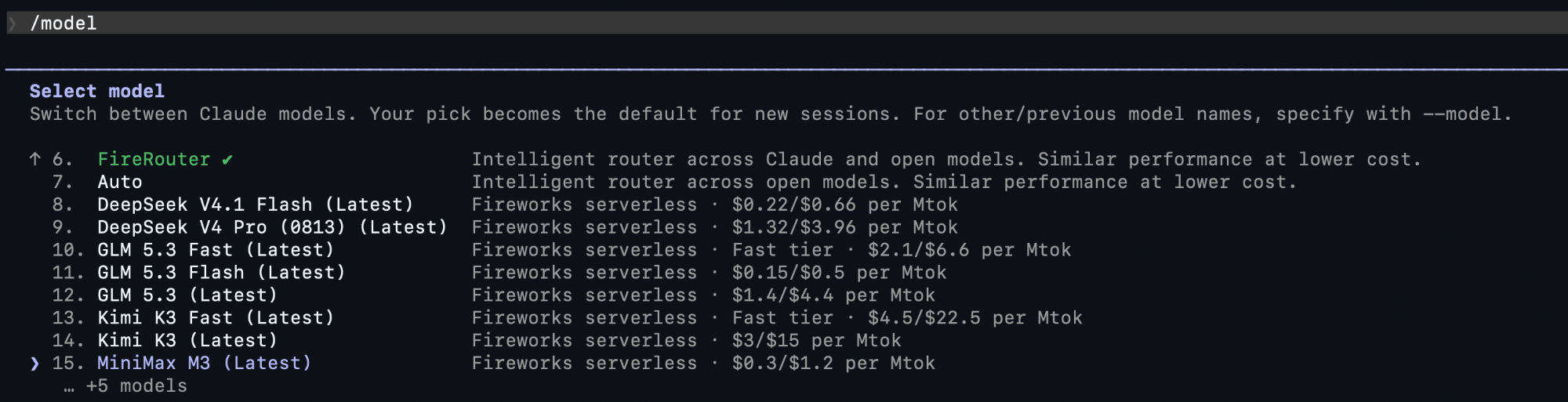
 Open `/model` to choose FireRouter, an open-model router, or a Fireworks model:
 ## Connect and restore
* **Connect** rewrites the harness config to call Fireworks and saves a snapshot under `~/.fireconnect/`.
* **`off`** restores file-based harnesses from that snapshot byte-for-byte. For IDE databases, it removes the settings and models FireConnect added.
* **Sign-in credentials and harness configurations are stored separately.** `fireconnect login` saves your credential through FireConnect's secret store. If a harness requires the key in its own configuration, FireConnect copies it there and restricts the file permissions. Run `fireconnect status` to see the active storage backend without revealing the key.
## Choose a model
Connecting registers coding-ready Fireworks models, including `auto`. Use `--model` when you want to add or select an explicit model or router:
```bash wrap theme={null}
fireconnect claude --model firerouter/opus
```
Restart or reopen the harness after changing a model. See [Coding Harnesses](/nexus/harnesses) for app-specific rules.
See [FireRouter](/nexus/firerouter) for router behavior, [Open Models](/nexus/open-models) for aliases and pinned versions, and [Harness Compatibility](/nexus/harness-compatibility) for FireRouter and MCP support.
### Use closed models without an LLM gateway
FireConnect does not require an LLM gateway. In Claude Code, routes with Claude models can use your Claude login. Some other harnesses accept a local Anthropic key. OpenAI models need an OpenAI key in [Provider Keys](/nexus/provider-keys). See [Harness Compatibility](/nexus/harness-compatibility) for each harness.
## Web search
Web search works through Fireworks with no extra setup. In Claude Code, the native `WebSearch` and `WebFetch` tools run server-side on Fireworks. The Codex CLI, the Codex app, and the ChatGPT desktop app keep their native web search. Search works with any Fireworks model or FireRouter ID. Web search pricing will be published soon; see [Web Search](/nexus/web-search).
Earlier FireConnect versions installed a `fireworks-websearch` MCP server for
Claude Code. That MCP is no longer available. Run `fireconnect upgrade` to
remove it; your own MCP servers are not changed. See
[Web Search](/nexus/web-search).
## Upgrade and uninstall
For upgrade and uninstall commands, see the [CLI Reference](/nexus/cli-reference).
## Connect and restore
* **Connect** rewrites the harness config to call Fireworks and saves a snapshot under `~/.fireconnect/`.
* **`off`** restores file-based harnesses from that snapshot byte-for-byte. For IDE databases, it removes the settings and models FireConnect added.
* **Sign-in credentials and harness configurations are stored separately.** `fireconnect login` saves your credential through FireConnect's secret store. If a harness requires the key in its own configuration, FireConnect copies it there and restricts the file permissions. Run `fireconnect status` to see the active storage backend without revealing the key.
## Choose a model
Connecting registers coding-ready Fireworks models, including `auto`. Use `--model` when you want to add or select an explicit model or router:
```bash wrap theme={null}
fireconnect claude --model firerouter/opus
```
Restart or reopen the harness after changing a model. See [Coding Harnesses](/nexus/harnesses) for app-specific rules.
See [FireRouter](/nexus/firerouter) for router behavior, [Open Models](/nexus/open-models) for aliases and pinned versions, and [Harness Compatibility](/nexus/harness-compatibility) for FireRouter and MCP support.
### Use closed models without an LLM gateway
FireConnect does not require an LLM gateway. In Claude Code, routes with Claude models can use your Claude login. Some other harnesses accept a local Anthropic key. OpenAI models need an OpenAI key in [Provider Keys](/nexus/provider-keys). See [Harness Compatibility](/nexus/harness-compatibility) for each harness.
## Web search
Web search works through Fireworks with no extra setup. In Claude Code, the native `WebSearch` and `WebFetch` tools run server-side on Fireworks. The Codex CLI, the Codex app, and the ChatGPT desktop app keep their native web search. Search works with any Fireworks model or FireRouter ID. Web search pricing will be published soon; see [Web Search](/nexus/web-search).
Earlier FireConnect versions installed a `fireworks-websearch` MCP server for
Claude Code. That MCP is no longer available. Run `fireconnect upgrade` to
remove it; your own MCP servers are not changed. See
[Web Search](/nexus/web-search).
## Upgrade and uninstall
For upgrade and uninstall commands, see the [CLI Reference](/nexus/cli-reference).