> ## Documentation Index
> Fetch the complete documentation index at: https://docs.fireworks.ai/llms.txt
> Use this file to discover all available pages before exploring further.
> ## Agent Instructions
> For Fireworks Nexus, start at https://docs.fireworks.ai/nexus.
> Use https://docs.fireworks.ai/nexus/quickstart for coding harnesses, custom agents, APIs, SDKs, and LLM gateways.
> Use https://docs.fireworks.ai/nexus/firerouter for how model routers work, the supported model list, composition, closed-model credentials, and pricing.
> Prefer canonical short model IDs such as firerouter/opus. In LiteLLM litellm_params.model, use the full path fireworks_ai/accounts/fireworks/routers/firerouter/opus.
> Family names such as opus track the latest evaluated family version; do not describe them as fixed model versions.
# FireRouter
> Learn what FireRouter is, how it picks a model for each user turn, which models you can route, how to pass Anthropic or OpenAI credentials, and how to watch routing live.
FireRouter gives you one stable model ID, such as `firerouter/opus`, and picks a model for each new user turn. Easy turns can go to a Fireworks open model. Harder turns can go to a closed model such as Claude Opus or GPT Astra. You pay the selected model's rate for each turn instead of a closed model's rate on every turn.
## How FireRouter works
1. You send a request to Fireworks with a `firerouter` model ID and your Fireworks API key.
2. For each new user turn, FireRouter predicts which model in the route will handle the turn well at the lowest cost.
3. The selected model serves the whole turn, including its tool calls, until the next user turn.
4. Fireworks open models run on Fireworks serverless. Closed models run on your own Anthropic or OpenAI account, using a credential you provide.
5. The response `model` field names the model that served the turn, such as `glm-5p3` or `claude-opus-5-5`.
FireRouter works with the Chat Completions, Messages, and Responses APIs. Family aliases such as `opus` can move to newer versions after Fireworks evaluates them, so you do not need to change your model ID.
## Choose a router
| Router ID | What it can use |
| ------------------------------- | ------------------------------------------------------------------------------------------------------------------------------------------------------------------------ |
| `firerouter` | Claude Opus or GPT Sol, [chosen from your credentials and client](#how-bare-firerouter-picks-its-closed-model), plus the [Fireworks open-model mix](#use-a-single-model) |
| `firerouter/opus` | The Claude Opus family, plus the Fireworks open-model mix |
| `firerouter/astra/opus/glm-5p3` | Only the models you list |
To pick your own models, [build a router ID](#build-a-router-id). For pinned models and more examples, see [Example router IDs](#example-router-ids) and [Use a single model](#use-a-single-model). For routing across open models only, use `auto` or `auto-instant`. See [Open Models](/nexus/open-models).
## Supported models
These are the model families you can use in a `firerouter` ID. Use a **family alias** to get newer versions after Fireworks evaluates them. Use the **model ID** to pin a version.
### Closed models
| Family | Family alias | Current model ID | Provider credential |
| ------------- | ------------ | ------------------ | --------------------------------------------------------------------- |
| Claude Opus | `opus` | `claude-opus-5-5` | Anthropic |
| Claude Fable | `fable` | `claude-fable-5-1` | Anthropic, with data retention enabled on your Anthropic organization |
| Claude Sonnet | None | `claude-sonnet-5` | Anthropic |
| GPT Sol | `sol` | `gpt-6-sol` | OpenAI |
| GPT Astra | `astra` | `gpt-6-astra` | OpenAI |
| GPT Luna | `luna` | `gpt-6-luna` | OpenAI |
To stay on an earlier version, use its model ID: `claude-opus-5` for Claude Opus 5, or `gpt-5.6-sol` for GPT 5.6 Sol. `firerouter/opus` and `firerouter/sol` follow the newest model in each family. Claude Sonnet has no family alias, so use its model ID.
Anthropic serves Claude Fable only to organizations with data retention enabled. Otherwise, Fable requests return a `400` error from Anthropic.
### Fireworks open models
| Family | Family alias | Model IDs |
| -------- | -------------- | ------------------------------------------ |
| Kimi | `kimi` or `k3` | `kimi-k3`, `kimi-k3-fast` |
| GLM | `glm` | `glm-5p3`, `glm-5p3-fast`, `glm-5p3-flash` |
| DeepSeek | None | `deepseek-v4p1-flash` |
Open models use your Fireworks API key. No other credential is needed.
Aliases such as `glm-latest` and `kimi-fast-latest` are Fireworks serverless
model IDs that you call directly, without FireRouter. Inside a `firerouter`
ID, use the family aliases and model IDs above. See
[Open Models](/nexus/open-models) for `-latest` aliases.
A `firerouter` ID with an unknown alias or model, such as `firerouter/sonnet` or `firerouter/glm-latest`, returns `404 Model id not found`.
## Build a router ID
A router ID is `firerouter/` followed by the models FireRouter can choose from, separated by slashes. To pick models and copy a ready-to-run command, use the [interactive builder](/nexus/firerouter/setup#build-your-request).
The anatomy of a router ID:
```text theme={null}
firerouter/opus/glm-5p3
│ └── more models to route to
└─────── primary model (first)
```
Start with the model you would use if you could only pick one. FireRouter uses it when it cannot make a confident choice for a turn, and on every turn at [routing preference](#balance-quality-and-savings) `1`.
Use a family alias such as `opus` to get newer versions automatically, or a model ID such as `claude-opus-5-5` to pin a version. See [Supported models](#supported-models).
```text theme={null}
firerouter/opus
```
Add the models FireRouter can use instead of the primary, usually a Fireworks open model for easier turns. You can also add a second closed family. After the primary, order does not matter.
```text theme={null}
firerouter/opus/glm-5p3
```
A route can list up to eight models. A route with more returns `404 Model id not found`.
To skip this step, stop at one closed model, such as `firerouter/opus`. FireRouter then adds the [Fireworks open-model mix](#use-a-single-model) for you. When you list models, FireRouter uses only the models you list.
Every request needs your Fireworks API key. Each closed provider in the route also needs a credential:
| If the route includes | You also need |
| -------------------------------------------- | ----------------------- |
| `opus`, `fable`, or a `claude-...` model | An Anthropic credential |
| `sol`, `astra`, `luna`, or a `gpt-...` model | An OpenAI credential |
| Only Fireworks open models | Nothing else |
Connect [Provider Keys](/nexus/provider-keys) once, or send `x-anthropic-api-key` or `x-openai-api-key` with each request. See [Provide Anthropic and OpenAI credentials](#provide-anthropic-and-openai-credentials).
Send `x-routing-preference: 1` to force the primary, so you can confirm the closed model is reachable:
```bash wrap theme={null}
curl https://api.fireworks.ai/inference/v1/chat/completions \
-H "Authorization: Bearer $FIREWORKS_API_KEY" \
-H "x-anthropic-api-key: $ANTHROPIC_API_KEY" \
-H "x-routing-preference: 1" \
-H "Content-Type: application/json" \
-d '{
"model": "firerouter/opus/glm-5p3",
"messages": [{"role": "user", "content": "Say pong in one word."}]
}'
```
The response `model` field shows `claude-opus-5-5`.
Remove the header for normal use. FireRouter then picks `claude-opus-5-5` or `glm-5p3` for each turn.
### Example router IDs
| Goal | Router ID | Credentials |
| ------------------------------------------ | ------------------------------------------------ | -------------------- |
| Claude quality, open-model savings | `firerouter/opus/glm-5p3` | Anthropic |
| GPT first, with Claude and Kimi available | `firerouter/astra/opus/kimi-k3` | OpenAI and Anthropic |
| Claude first, with GPT and two open models | `firerouter/opus/astra/glm-5p3/kimi-k3` | Anthropic and OpenAI |
| Fast, low-cost GPT mix | `firerouter/sol/glm-5p3-flash` | OpenAI |
| Claude Sonnet with GLM | `firerouter/claude-sonnet-5/glm-5p3` | Anthropic |
| GPT Luna with Kimi | `firerouter/luna/kimi-k3` | OpenAI |
| Stay on GPT 5.6 Sol | `firerouter/gpt-5.6-sol/glm-5p3` | OpenAI |
| Open models, chosen by Fireworks | `auto` | None |
| Fastest open models, chosen by Fireworks | `auto-instant` | None |
| Open models you choose | `firerouter/kimi-k3/glm-5p3/deepseek-v4p1-flash` | None |
### Route across open models with `auto`
`auto` and `auto-instant` route each turn across Fireworks open models only, so they need no closed-model credential. Fireworks picks the models behind them and updates them as new open models are released and evaluated.
| Router ID | Best for | Models it uses today |
| -------------- | --------------------------------- | ----------------------------------------------------------------- |
| `auto` | The best open model for each turn | GLM 5.3, GLM 5.3 Flash, and Kimi K3 |
| `auto-instant` | The lowest latency | GLM 5.3 Flash, with other open models taking over when it is slow |
`auto` is the default model when you connect a harness with FireConnect, except in Claude Code, which defaults to `firerouter`. `firerouter/auto` and `firerouter/auto-instant` also work and behave the same way. To choose the open models yourself, list them, as in `firerouter/kimi-k3/glm-5p3`. See [Open Models](/nexus/open-models) for fast-model governance and other open-model IDs.
### Use a single model
A router ID with one model behaves differently depending on whether that model is closed or open.
```text theme={null}
firerouter/opus
firerouter/claude-opus-5-5
firerouter/astra
firerouter/sol
```
FireRouter routes between that closed model and the **Fireworks open-model mix**. You do not need to list any open models.
The mix currently includes GLM 5.3 and GLM 5.3 Flash. Fireworks manages it and updates it as new open models are released and evaluated, so your router ID keeps improving without changes on your side.
Easy turns usually go to the open-model mix. Harder turns usually go to the closed model. At routing preference `1`, every turn uses the closed model.
To choose the open models yourself instead of the managed mix, list them:
`firerouter/opus/kimi-k3`.
```text theme={null}
firerouter/glm-5p3
firerouter/kimi-k3
```
FireRouter serves that model on every turn, with no routing. This is the same as calling the model directly.
To route across open models, list several, such as `firerouter/kimi-k3/glm-5p3`, or use [`auto`](/nexus/open-models).
### How bare `firerouter` picks its closed model
Bare `firerouter` works like one closed model. It picks that model from the credentials available to the request, then routes between it and the open-model mix:
| Credentials available | Closed model |
| --------------------- | ------------------------------------------------------------------------------------------------------------------------------------- |
| Anthropic only | Claude Opus |
| OpenAI only | GPT Sol |
| Anthropic and OpenAI | GPT Sol for Responses API requests and Codex. Claude Opus for Messages API requests, Claude Code, and other Chat Completions clients. |
| Neither | None. Kimi K3 and the open-model mix serve every turn. |
If you connected [Amazon Bedrock](/nexus/provider-keys/bedrock) and mapped the model, FireRouter uses your Bedrock copy of it. To choose the closed model yourself, name it, as in `firerouter/opus` or `firerouter/sol`.
## Use FireRouter from your tools
The router ID is the same everywhere. Only the setup changes.
| You are using | Setup guide | Closed-model credential |
| ------------------------------------------------------- | -------------------------------------------------------------- | --------------------------------------------------------------------------------- |
| Claude Code, Codex, OpenCode, or another coding harness | [Set up with FireConnect](/nexus/firerouter/setup#fireconnect) | Your Claude login in Claude Code, a local key in some harnesses, or Provider Keys |
| LiteLLM, Portkey, or another LLM gateway | [Connect an LLM gateway](/nexus/firerouter/setup#llm-gateway) | Provider Keys, or keys stored in the gateway config |
| Your own app, agent, or script | [Use the API or SDK](/nexus/firerouter/setup#api-and-sdk) | Provider Keys, or a request header |
You do not need FireConnect to use FireRouter from an application or gateway. You need a Fireworks API key, plus a credential for each closed provider in your route.
## Provide Anthropic and OpenAI credentials
FireRouter calls closed models through your own Anthropic, OpenAI, or [Amazon Bedrock](/nexus/provider-keys/bedrock) account. Your Fireworks API key is always required. Each closed provider in the route also needs a credential. For Anthropic and OpenAI, there are two ways to provide one. Bedrock uses Provider Keys only, with each model mapped to a Bedrock model ID and region.
| | Provider Keys | Request headers |
| ----------------------- | ------------------------------------------------- | ---------------------------------------------------------------------- |
| **Where the key lives** | Stored once in your Fireworks account by an admin | Sent with every request as `x-anthropic-api-key` or `x-openai-api-key` |
| **Who holds the key** | Only the account admin who connects it | Every client, or the gateway that adds the header |
| **Exposure** | Never returned in full after you save it | Can appear in client configs and gateway request logs |
| **Best for** | Production, shared gateways, and teams | Testing, or choosing a key per request |
| **Availability** | Not enabled on every account | Every account |
If a request carries a provider header, that header takes precedence over the stored Provider Key for that provider.
Provider Keys is not yet available on every account. If **Provider Keys**
does not appear in [Settings](https://app.fireworks.ai/settings/provider-keys),
[contact the Fireworks team](https://fireworks.ai/demo-request) to enable it.
Self-serve setup is coming soon.
Setup steps: [Provider Keys](/nexus/provider-keys), [request headers for APIs and SDKs](/nexus/apis-and-sdks#credentials), and [gateway credentials](/nexus/llm-gateways#provide-closed-model-credentials).
### What happens without a closed-model credential
If a route includes a closed model and no credential is available for that provider, FireRouter leaves that model out and serves the turn with the other models in the route. For example, `firerouter/opus` with no Anthropic credential serves every turn with Fireworks open models.
A request returns `400 no_credential` instead when you set routing preference `1`, which forces the route's closed primary, or when you call a closed model ID directly, such as `claude-opus-5-5` without `firerouter/`.
## Verify routing
To confirm that closed models are reachable:
1. Send a request with the `x-routing-preference: 1` header. FireRouter then uses the route's primary model on every turn. See the test request in [Build a router ID](#build-a-router-id), step 4.
2. Check the response `model` field. It should name the closed model, such as `claude-opus-5-5`. A `400 no_credential` error means the provider credential is missing.
3. Remove the header and send an easy prompt. The `model` field usually names an open model such as `glm-5p3`. Harder prompts, such as debugging a concurrency bug or writing a proof, are more likely to use the closed model. No single request is guaranteed to use either.
## Watch routing live
In Claude Code, you can watch each turn's model choice as you work. [Connect Claude Code](/nexus/harnesses#claude-code) with a FireRouter model, install `tmux`, then run:
```bash wrap theme={null}
fireconnect claude live
```
Claude Code opens on the left. A live meter on the right adds one row per user turn with the model or models selected, token buckets, cache share, estimated cost, and a prompt preview.
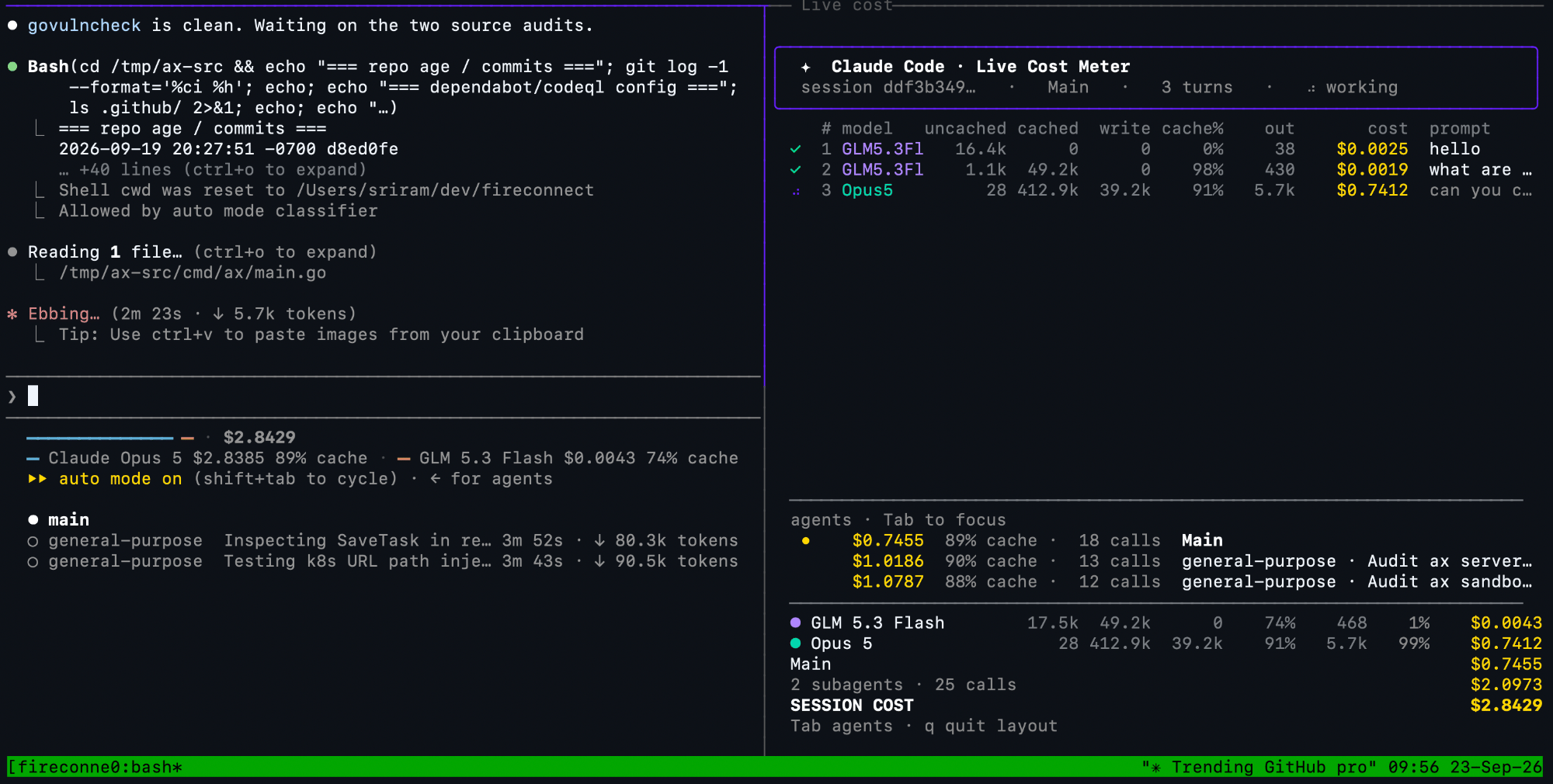 To follow a specific session, run `fireconnect claude live --session `. Meter columns and pricing: [Session Cost](/nexus/session-usage).
## Balance quality and savings
Routing preference controls how strongly a `firerouter` request favors its primary model or lower-cost models. Send `x-routing-preference` with a value from `1` (`max-intelligence`) to `5` (`max-savings`). The default is `3` (`balanced`). In FireConnect, pass it when you connect:
```bash wrap theme={null}
fireconnect claude --model firerouter --routing-preference balanced
```
Routing preference is set per request with the header or per harness with FireConnect. It is not part of the model ID. Harness support varies. See [Routing Preferences](/nexus/routing-preferences).
## Pay for the model that serves each turn
* **Fireworks open models** bill to your Fireworks account at their [serverless rates](/serverless/pricing).
* **Closed models** bill to the Anthropic or OpenAI account whose credential served the turn.
* **Cached input** bills at the serving model's cached-input rate.
Use [Usage and Cost](/nexus/metrics) to review Fireworks usage and Claude Code session estimates.
## Limitations
* FireRouter is not available through Microsoft Foundry. See [Foundry for Coding Harnesses](/nexus/microsoft-foundry).
* Accounts with data residency enabled cannot use FireRouter. Use a residency-compatible pinned serverless model instead.
To follow a specific session, run `fireconnect claude live --session `. Meter columns and pricing: [Session Cost](/nexus/session-usage).
## Balance quality and savings
Routing preference controls how strongly a `firerouter` request favors its primary model or lower-cost models. Send `x-routing-preference` with a value from `1` (`max-intelligence`) to `5` (`max-savings`). The default is `3` (`balanced`). In FireConnect, pass it when you connect:
```bash wrap theme={null}
fireconnect claude --model firerouter --routing-preference balanced
```
Routing preference is set per request with the header or per harness with FireConnect. It is not part of the model ID. Harness support varies. See [Routing Preferences](/nexus/routing-preferences).
## Pay for the model that serves each turn
* **Fireworks open models** bill to your Fireworks account at their [serverless rates](/serverless/pricing).
* **Closed models** bill to the Anthropic or OpenAI account whose credential served the turn.
* **Cached input** bills at the serving model's cached-input rate.
Use [Usage and Cost](/nexus/metrics) to review Fireworks usage and Claude Code session estimates.
## Limitations
* FireRouter is not available through Microsoft Foundry. See [Foundry for Coding Harnesses](/nexus/microsoft-foundry).
* Accounts with data residency enabled cannot use FireRouter. Use a residency-compatible pinned serverless model instead.