> ## Documentation Index
> Fetch the complete documentation index at: https://docs.fireworks.ai/llms.txt
> Use this file to discover all available pages before exploring further.
> ## Agent Instructions
> For Fireworks Nexus, start at https://docs.fireworks.ai/nexus.
> Use https://docs.fireworks.ai/nexus/quickstart for coding harnesses, custom agents, APIs, SDKs, and LLM gateways.
> Use https://docs.fireworks.ai/nexus/firerouter for how model routers work, the supported model list, composition, closed-model credentials, and pricing.
> Prefer canonical short model IDs such as firerouter/opus. In LiteLLM litellm_params.model, use the full path fireworks_ai/accounts/fireworks/routers/firerouter/opus.
> Family names such as opus track the latest evaluated family version; do not describe them as fixed model versions.
# Coding Harnesses
> Connect Claude Code, the Claude Agent SDK, OpenCode, Codex, Pi, Cursor IDE, VS Code, Copilot, or DeepSeek Harness to Fireworks, with FireConnect or by editing the harness settings yourself.
Every harness below works two ways. **FireConnect** writes the settings for you and restores them with `off`. **Manual setup** shows the same settings so you can apply them yourself, with no extra tool installed.
Messages API
Responses API
Chat Completions
Chat Completions
Chat Completions
Chat Completions
Chat Completions
Chat Completions
Chat Completions
## Before you start
[Install FireConnect](/nexus/fireconnect#quick-start) and sign in once:
```bash wrap theme={null}
fireconnect login
```
* **Connect:** `fireconnect `. Add `--model ` to choose a model or router. Browse IDs with `fireconnect model list`.
* **Quit first:** fully quit Cursor IDE, VS Code, and the Copilot App before connecting or running `off`. Restart other harnesses after connecting.
* **Check:** `fireconnect status` is read-only and safe while the app is open.
* **Undo:** `fireconnect off` restores the settings FireConnect saved under `~/.fireconnect/`.
Create an API key in [Fireworks settings](https://app.fireworks.ai/settings/users/api-keys) and export it:
```bash wrap theme={null}
export FIREWORKS_API_KEY="fw_..."
```
Every harness uses the same Fireworks endpoints:
| Harness API | Base URL |
| - | - |
| Anthropic Messages | `https://api.fireworks.ai/inference` |
| OpenAI Chat Completions or Responses | `https://api.fireworks.ai/inference/v1` |
Use any model ID from [Open Models](/nexus/open-models), such as `glm-latest`, or a router from [FireRouter](/nexus/firerouter#supported-models), such as `firerouter/opus`. Back up a settings file before you edit it.
## Claude Code
Anthropic Messages FireRouter Native web search
```bash wrap theme={null}
fireconnect claude
fireconnect claude status
```
Start a new session, or exit and run `claude --resume `. FireConnect selects FireRouter by default. To choose another model, pass `--model`:
```bash wrap theme={null}
fireconnect claude --model glm-5p3-flash
```
`--model` sets the default model for new sessions. Anthropic tier slots stay native, and `/model` lists `auto`, the routers, and the Fireworks catalog.
```json ~/.claude/settings.json theme={null}
{
"env": {
"ANTHROPIC_BASE_URL": "https://api.fireworks.ai/inference",
"ANTHROPIC_CUSTOM_HEADERS": "X-Fireworks-Api-Key: fw_...",
"DISABLE_TELEMETRY": "1",
"CLAUDE_CODE_DISABLE_NONESSENTIAL_TRAFFIC": "1",
"ENABLE_TOOL_SEARCH": "true"
},
"modelPicker": {
"options": [
{ "model": "firerouter[1m]", "label": "FireRouter" },
{ "model": "auto[1m]", "label": "Auto" }
]
},
"model": "firerouter[1m]",
"statusLine": { "type": "command", "command": "... claude-statusline.mjs" }
}
```
* The Fireworks key goes in a custom header, so your Claude login stays available for routes with Claude models.
* `[1m]` marks 1M-context models.
* The status line shows the estimated session cost. It is added only if you do not already have one.
* FireConnect also turns off Claude Code telemetry and nonessential traffic, and enables MCP tool search.
* `~/.claude.json` records approval for the FireConnect credential so Claude Code does not prompt for it.
Add these values to `~/.claude/settings.json`:
```json ~/.claude/settings.json theme={null}
{
"env": {
"ANTHROPIC_BASE_URL": "https://api.fireworks.ai/inference",
"ANTHROPIC_AUTH_TOKEN": "fw_YOUR_FIREWORKS_API_KEY"
},
"model": "glm-latest"
}
```
Or set them for one shell:
```bash wrap theme={null}
export ANTHROPIC_BASE_URL="https://api.fireworks.ai/inference"
export ANTHROPIC_API_KEY="$FIREWORKS_API_KEY"
claude --model glm-latest
```
Run `claude`. Claude Code may ask once whether to use the API key; approve it.
The first reply comes from the Fireworks model you set.
Set `"model": "firerouter/opus"`. For Claude models in the route, connect an Anthropic [Provider Key](/nexus/provider-keys), or add `x-anthropic-api-key` to `ANTHROPIC_CUSTOM_HEADERS`.
Claude Code's `/model` picker does not list Fireworks models you set by hand. Change models in `settings.json` or with `claude --model `. Claude Code may log `unrecognized_model` for Fireworks IDs; requests still succeed.
* Bare `firerouter` and routes with Claude models can use your Claude login when you connect with FireConnect.
* `firerouter/astra`, `firerouter/sol`, and other GPT routes need an OpenAI key in [Provider Keys](/nexus/provider-keys) with FireConnect, or an `x-openai-api-key` header in manual setup.
* See [Routing Preferences](/nexus/routing-preferences) for `--routing-preference` and [Harness Compatibility](/nexus/harness-compatibility) for cross-harness support.
For the status line and `fireconnect claude usage`, see [Usage and Cost](/nexus/metrics). Claude Code's own in-app cost uses Anthropic list prices; use the FireConnect status line for the Fireworks estimate. For a side-by-side comparison, see the [Side-by-Side Demo](/nexus/demo).
* Text-only models fail on pasted images. Use `/rewind`, or switch to a vision model such as `glm-5p3-flash`.
* Resume or restart the session after changing models.
## Claude Agent SDK
Anthropic Messages
The Claude Agent SDK can reuse the Claude Code settings above. Connect Claude Code first, with FireConnect or manually:
```bash wrap theme={null}
fireconnect claude --model firerouter/opus
```
In the SDK query options, include `settingSources: ["user"]`. The SDK then reads the Fireworks endpoint, model, and credentials from `~/.claude/settings.json`.
Claude Desktop is not supported. `fireconnect claude` does not configure Claude Desktop's third-party inference provider.
## Codex
OpenAI Responses FireRouter Native web search
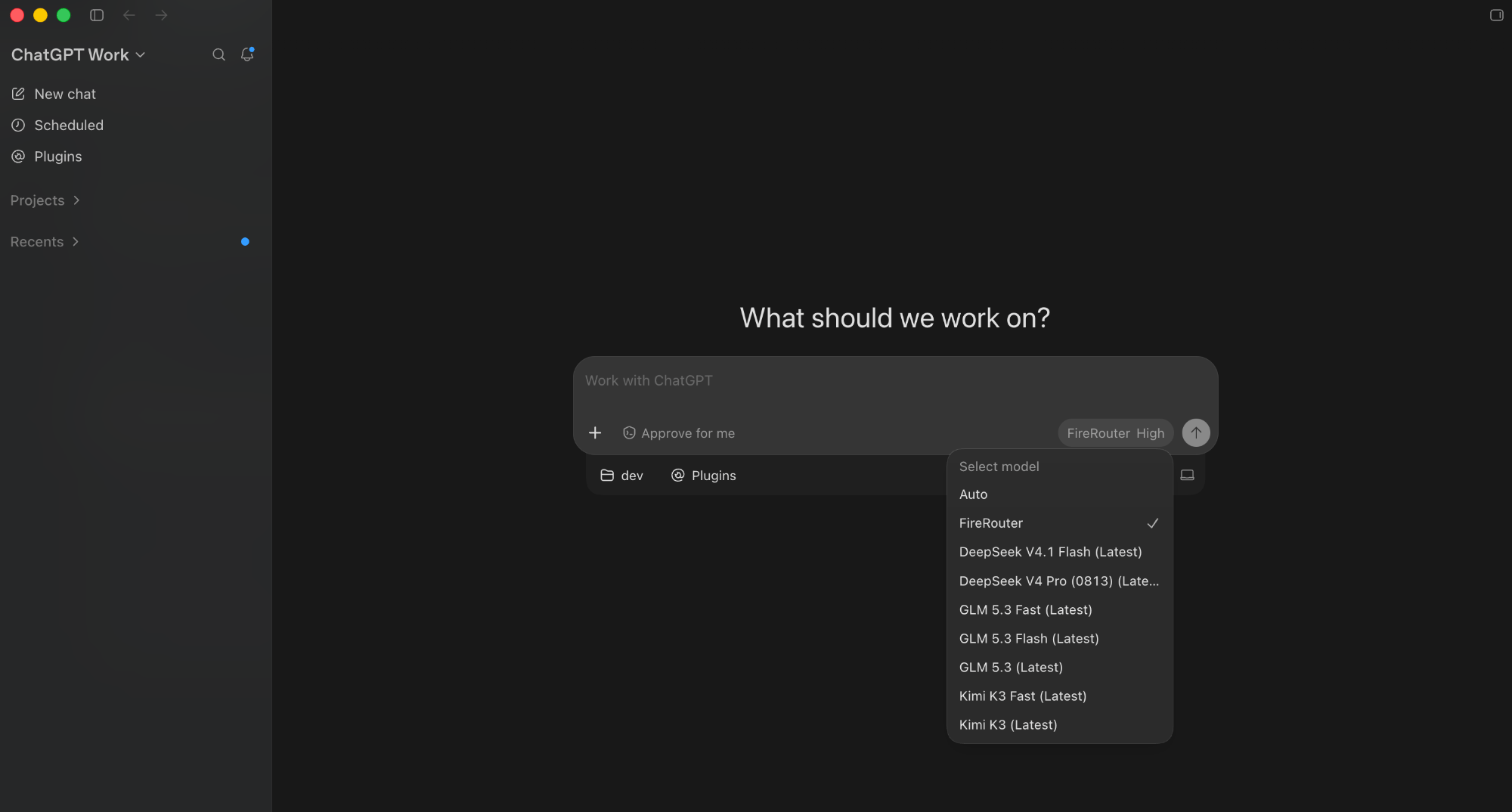
The Codex CLI, the Codex app, and the ChatGPT desktop app share one config in `~/.codex/config.toml`, so one setup covers all three. **Quit the Codex app and the ChatGPT app** before you change it so their model lists refresh.
MCP servers and plugins in the ChatGPT desktop app don't work reliably while
FireConnect is on. See [Harness Compatibility](/nexus/harness-compatibility#mcp).
```bash wrap theme={null}
fireconnect codex
fireconnect codex status
```
The default model is `auto`. To add FireRouter to the Codex and ChatGPT model pickers, run `fireconnect codex --model firerouter`. Exit Codex and run `codex resume `, or start a new session.
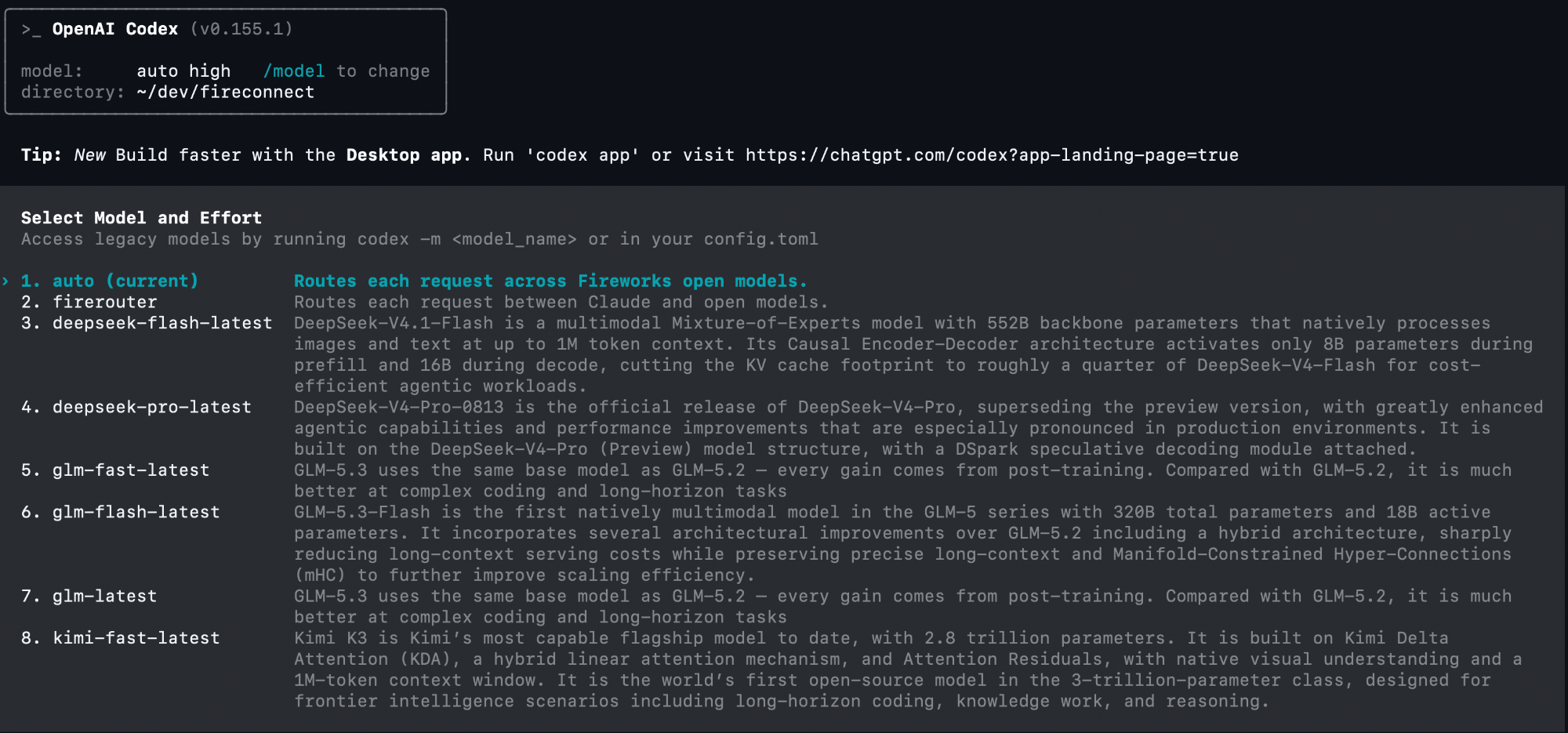 ```toml ~/.codex/config.toml theme={null}
model_provider = "fireworks-ai"
model_catalog_json = "~/.codex/fireworks-model-catalog.json"
model = "auto"
[model_providers.fireworks-ai]
name = "Fireworks"
base_url = "https://api.fireworks.ai/inference/v1"
wire_api = "responses"
experimental_bearer_token = "fw_..."
requires_openai_auth = false
```
FireConnect keeps your other TOML settings, saves the key with file mode `0600`, and writes a model catalog so Codex knows each model's context window and capabilities.
```toml ~/.codex/config.toml theme={null}
model_provider = "fireworks-ai"
model = "glm-latest"
[model_providers.fireworks-ai]
name = "Fireworks"
base_url = "https://api.fireworks.ai/inference/v1"
wire_api = "responses"
env_key = "FIREWORKS_API_KEY"
```
```bash wrap theme={null}
codex
```
Codex answers from `glm-latest`.
Without a model catalog, Codex warns that it has no metadata for Fireworks models and uses fallback limits. FireConnect writes that catalog for you.
```toml ~/.codex/config.toml theme={null}
model_provider = "fireworks-ai"
model_catalog_json = "~/.codex/fireworks-model-catalog.json"
model = "auto"
[model_providers.fireworks-ai]
name = "Fireworks"
base_url = "https://api.fireworks.ai/inference/v1"
wire_api = "responses"
experimental_bearer_token = "fw_..."
requires_openai_auth = false
```
FireConnect keeps your other TOML settings, saves the key with file mode `0600`, and writes a model catalog so Codex knows each model's context window and capabilities.
```toml ~/.codex/config.toml theme={null}
model_provider = "fireworks-ai"
model = "glm-latest"
[model_providers.fireworks-ai]
name = "Fireworks"
base_url = "https://api.fireworks.ai/inference/v1"
wire_api = "responses"
env_key = "FIREWORKS_API_KEY"
```
```bash wrap theme={null}
codex
```
Codex answers from `glm-latest`.
Without a model catalog, Codex warns that it has no metadata for Fireworks models and uses fallback limits. FireConnect writes that catalog for you.
 When you resume an old session, select the provider explicitly:
```bash wrap theme={null}
codex resume -c model_provider="fireworks-ai"
```
**MiniMax models don't work on Codex.** Codex may insert assistant messages between `tool_calls` and `tool_results`, which MiniMax templates reject. Use a Chat Completions harness such as OpenCode for MiniMax.
## OpenCode
OpenAI Chat Completions FireRouter
```bash wrap theme={null}
fireconnect opencode
fireconnect opencode status
```
Restart OpenCode. The default model is `auto`, stored as `fireworks-ai/auto`. Short IDs such as `glm-5p2` expand to full Fireworks paths.
When you resume an old session, select the provider explicitly:
```bash wrap theme={null}
codex resume -c model_provider="fireworks-ai"
```
**MiniMax models don't work on Codex.** Codex may insert assistant messages between `tool_calls` and `tool_results`, which MiniMax templates reject. Use a Chat Completions harness such as OpenCode for MiniMax.
## OpenCode
OpenAI Chat Completions FireRouter
```bash wrap theme={null}
fireconnect opencode
fireconnect opencode status
```
Restart OpenCode. The default model is `auto`, stored as `fireworks-ai/auto`. Short IDs such as `glm-5p2` expand to full Fireworks paths.
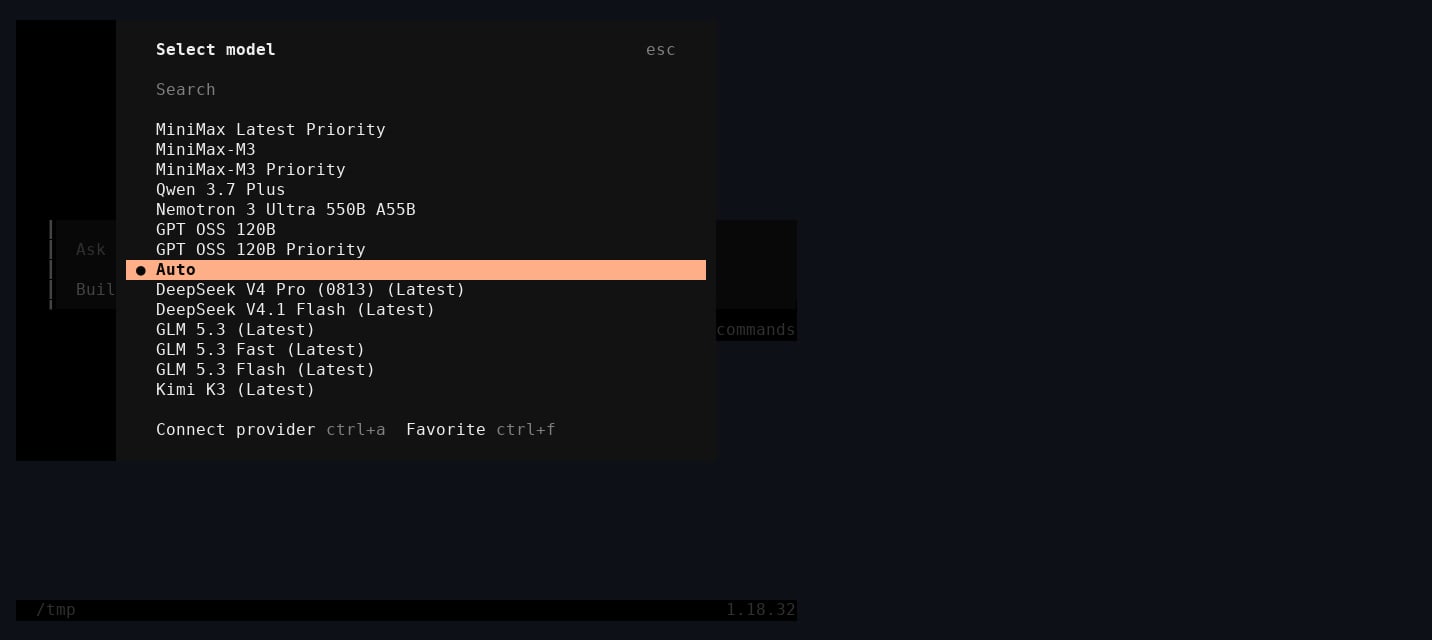 ```json ~/.config/opencode/opencode.json theme={null}
{
"provider": {
"fireworks-ai": {
"options": { "apiKey": "fw_..." },
"models": {
"auto": { "name": "Auto", "limit": { "context": 1048575, "output": 131072 } },
"glm-latest": { "name": "GLM (Latest)" }
}
}
},
"model": "fireworks-ai/auto"
}
```
The file is saved with mode `0600`. FireConnect never changes `auth.json`. Use `--config-path` for a config stored elsewhere.
**Fastest:** in OpenCode, run `/connect`, search **fireworks.ai**, paste your key, and pick a model with `/models`.
**Or edit the config** to add routers and pin a default:
```json ~/.config/opencode/opencode.json theme={null}
{
"$schema": "https://opencode.ai/config.json",
"provider": {
"fireworks-ai": {
"options": { "apiKey": "{env:FIREWORKS_API_KEY}" },
"models": {
"glm-latest": { "name": "GLM (Latest)" },
"firerouter/opus": { "name": "FireRouter Opus" }
}
}
},
"model": "fireworks-ai/glm-latest"
}
```
`opencode run -m fireworks-ai/firerouter/opus "hello"` answers through FireRouter.
## Pi
OpenAI Chat Completions FireRouter
```bash wrap theme={null}
fireconnect pi
fireconnect pi status
```
Restart Pi if it was running. The default model is `auto`.
```json ~/.pi/agent/settings.json theme={null}
{
"defaultProvider": "fireworks",
"defaultModel": "auto",
"enabledModels": ["fireworks/accounts/fireworks/routers/*", "fireworks/auto"]
}
```
```json ~/.pi/agent/auth.json theme={null}
{ "fireworks": { "type": "api_key", "key": "fw_..." } }
```
`models.json` adds the Fireworks catalog to Pi's built-in `fireworks` provider. FireConnect tracks the IDs it adds so `off` removes only those. Use `--settings-path` for a settings file stored elsewhere.
Pi has a built-in `fireworks` provider that reads `FIREWORKS_API_KEY`. Set it as the default:
```json ~/.pi/agent/settings.json theme={null}
{
"defaultProvider": "fireworks",
"defaultModel": "accounts/fireworks/routers/glm-latest"
}
```
`pi -p "hello"` answers from GLM.
## Cursor IDE
OpenAI Chat Completions FireRouter with Provider Keys
`fireconnect cursor` configures Cursor IDE. Cursor CLI (`agent` or `cursor-agent`) is not supported. **Fully quit Cursor IDE before connecting or running `off`.**
```bash wrap theme={null}
fireconnect cursor
fireconnect cursor status
```
FireConnect points every existing mode in `modelConfig` at the Fireworks default and registers the catalog in the picker. Reopen Cursor IDE and choose a Fireworks model.
```json ~/.config/opencode/opencode.json theme={null}
{
"provider": {
"fireworks-ai": {
"options": { "apiKey": "fw_..." },
"models": {
"auto": { "name": "Auto", "limit": { "context": 1048575, "output": 131072 } },
"glm-latest": { "name": "GLM (Latest)" }
}
}
},
"model": "fireworks-ai/auto"
}
```
The file is saved with mode `0600`. FireConnect never changes `auth.json`. Use `--config-path` for a config stored elsewhere.
**Fastest:** in OpenCode, run `/connect`, search **fireworks.ai**, paste your key, and pick a model with `/models`.
**Or edit the config** to add routers and pin a default:
```json ~/.config/opencode/opencode.json theme={null}
{
"$schema": "https://opencode.ai/config.json",
"provider": {
"fireworks-ai": {
"options": { "apiKey": "{env:FIREWORKS_API_KEY}" },
"models": {
"glm-latest": { "name": "GLM (Latest)" },
"firerouter/opus": { "name": "FireRouter Opus" }
}
}
},
"model": "fireworks-ai/glm-latest"
}
```
`opencode run -m fireworks-ai/firerouter/opus "hello"` answers through FireRouter.
## Pi
OpenAI Chat Completions FireRouter
```bash wrap theme={null}
fireconnect pi
fireconnect pi status
```
Restart Pi if it was running. The default model is `auto`.
```json ~/.pi/agent/settings.json theme={null}
{
"defaultProvider": "fireworks",
"defaultModel": "auto",
"enabledModels": ["fireworks/accounts/fireworks/routers/*", "fireworks/auto"]
}
```
```json ~/.pi/agent/auth.json theme={null}
{ "fireworks": { "type": "api_key", "key": "fw_..." } }
```
`models.json` adds the Fireworks catalog to Pi's built-in `fireworks` provider. FireConnect tracks the IDs it adds so `off` removes only those. Use `--settings-path` for a settings file stored elsewhere.
Pi has a built-in `fireworks` provider that reads `FIREWORKS_API_KEY`. Set it as the default:
```json ~/.pi/agent/settings.json theme={null}
{
"defaultProvider": "fireworks",
"defaultModel": "accounts/fireworks/routers/glm-latest"
}
```
`pi -p "hello"` answers from GLM.
## Cursor IDE
OpenAI Chat Completions FireRouter with Provider Keys
`fireconnect cursor` configures Cursor IDE. Cursor CLI (`agent` or `cursor-agent`) is not supported. **Fully quit Cursor IDE before connecting or running `off`.**
```bash wrap theme={null}
fireconnect cursor
fireconnect cursor status
```
FireConnect points every existing mode in `modelConfig` at the Fireworks default and registers the catalog in the picker. Reopen Cursor IDE and choose a Fireworks model.
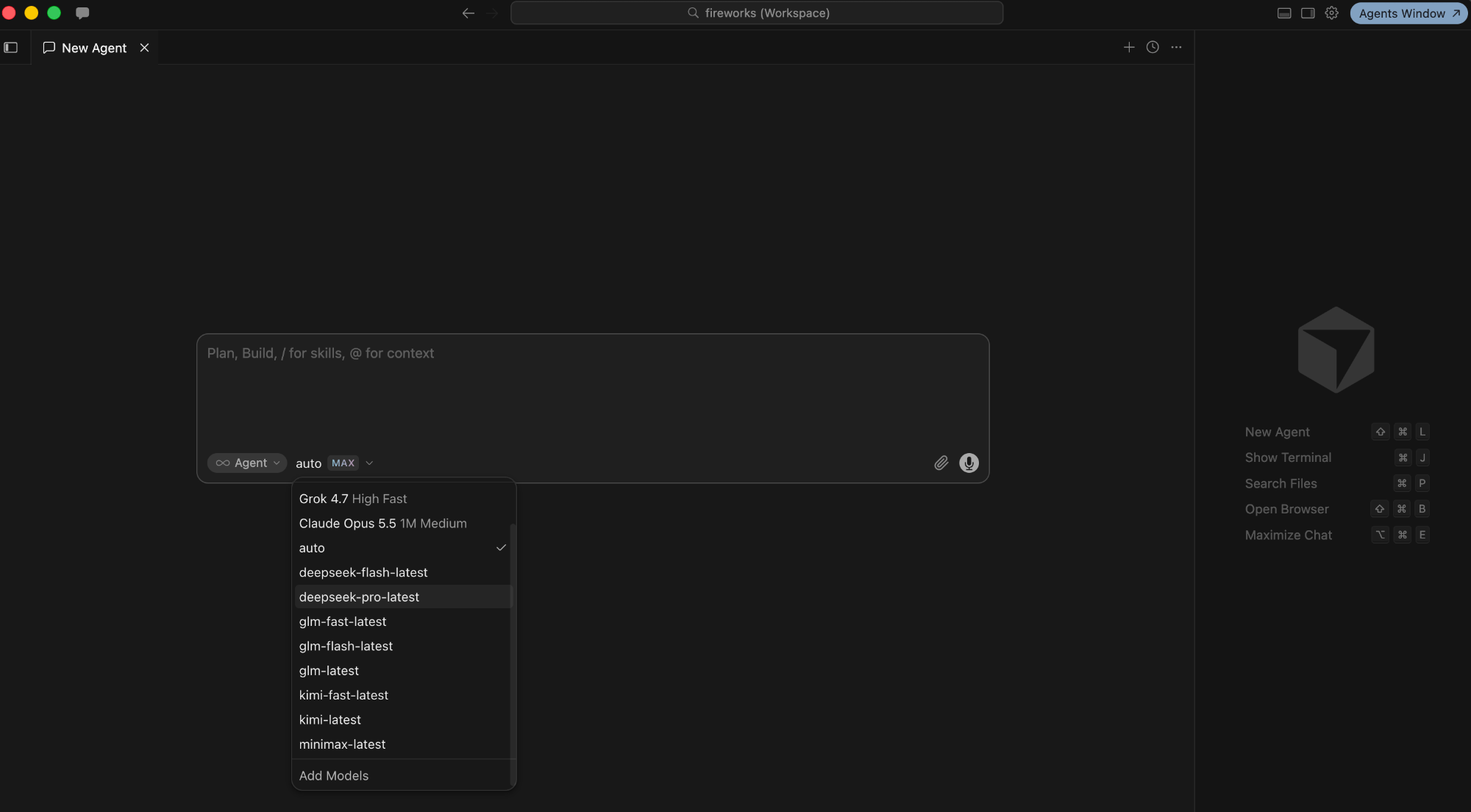 Cursor IDE stores AI settings in SQLite (`state.vscdb` under `~/.config/Cursor`, `~/Library/Application Support/Cursor`, or `%APPDATA%\Cursor`):
| Setting | Value |
| - | - |
| `cursorAuth/openAIKey` | Your Fireworks key |
| `openAIBaseUrl` | `https://api.fireworks.ai/inference/v1` |
| `aiSettings.userAddedModels` | The Fireworks catalog, tracked for a clean `off` |
| `aiSettings.modelOverrideDisabled` | Cursor's built-in models, hidden while connected |
| `aiSettings.modelConfig[]` | The Fireworks model for each mode |
Your previous auth state is saved under `~/.fireconnect/cursor/`. Use `--db-path` for a non-default `state.vscdb`.
In Cursor IDE, open **Settings**, then **Models**.
Under **API Keys**, paste your Fireworks key into **OpenAI API Key**. Turn on **Override OpenAI Base URL** and enter `https://api.fireworks.ai/inference/v1`.
Add a custom model with a Fireworks ID, such as `glm-latest`, then select it in chat.
**While connected, only Fireworks models work.** Cursor IDE's built-in models are hidden until you run `off`. Cursor IDE also enforces a server-side allowlist, so not every Fireworks model is selectable. Some features may still use Cursor's own backend, depending on plan and version.
## VS Code
OpenAI Chat Completions FireRouter
FireConnect adds a **Fireworks** provider to GitHub Copilot Chat's custom endpoints. This requires Copilot **Pro or Enterprise**. **Quit VS Code before connecting or running `off`.**
```bash wrap theme={null}
fireconnect vscode
fireconnect vscode status
```
Restart VS Code, then pick a model under **Other Models → Fireworks** in Copilot Chat. `glm-latest` and `glm-fast-latest` are text-only; `glm-5p3-flash` supports images.
Cursor IDE stores AI settings in SQLite (`state.vscdb` under `~/.config/Cursor`, `~/Library/Application Support/Cursor`, or `%APPDATA%\Cursor`):
| Setting | Value |
| - | - |
| `cursorAuth/openAIKey` | Your Fireworks key |
| `openAIBaseUrl` | `https://api.fireworks.ai/inference/v1` |
| `aiSettings.userAddedModels` | The Fireworks catalog, tracked for a clean `off` |
| `aiSettings.modelOverrideDisabled` | Cursor's built-in models, hidden while connected |
| `aiSettings.modelConfig[]` | The Fireworks model for each mode |
Your previous auth state is saved under `~/.fireconnect/cursor/`. Use `--db-path` for a non-default `state.vscdb`.
In Cursor IDE, open **Settings**, then **Models**.
Under **API Keys**, paste your Fireworks key into **OpenAI API Key**. Turn on **Override OpenAI Base URL** and enter `https://api.fireworks.ai/inference/v1`.
Add a custom model with a Fireworks ID, such as `glm-latest`, then select it in chat.
**While connected, only Fireworks models work.** Cursor IDE's built-in models are hidden until you run `off`. Cursor IDE also enforces a server-side allowlist, so not every Fireworks model is selectable. Some features may still use Cursor's own backend, depending on plan and version.
## VS Code
OpenAI Chat Completions FireRouter
FireConnect adds a **Fireworks** provider to GitHub Copilot Chat's custom endpoints. This requires Copilot **Pro or Enterprise**. **Quit VS Code before connecting or running `off`.**
```bash wrap theme={null}
fireconnect vscode
fireconnect vscode status
```
Restart VS Code, then pick a model under **Other Models → Fireworks** in Copilot Chat. `glm-latest` and `glm-fast-latest` are text-only; `glm-5p3-flash` supports images.
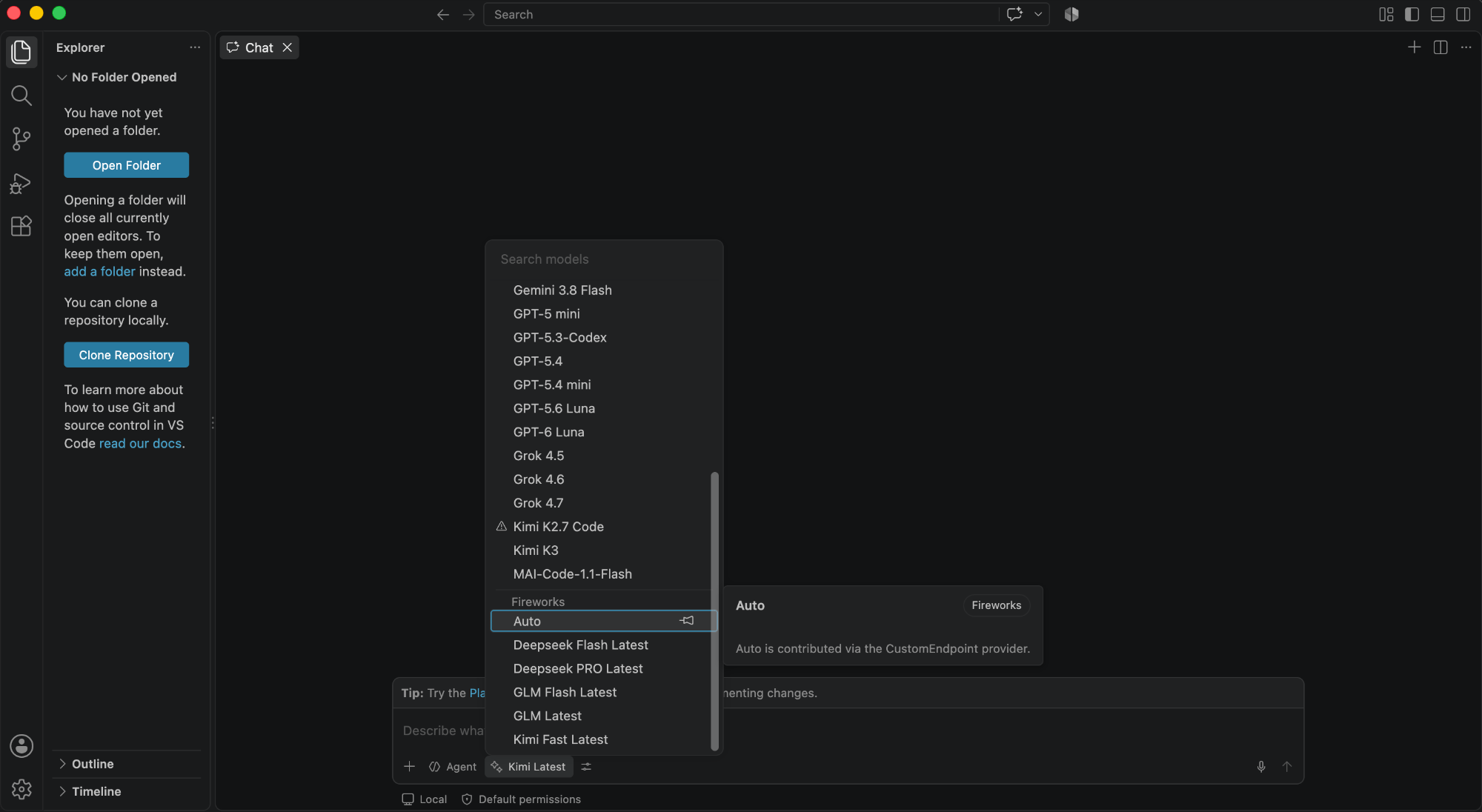 ```json chatLanguageModels.json theme={null}
[
{
"name": "Fireworks",
"vendor": "customendpoint",
"apiType": "chat-completions",
"apiKey": "${input:chat.lm.secret.fw-...}",
"models": [
{
"id": "auto",
"name": "Auto",
"url": "https://api.fireworks.ai/inference",
"maxInputTokens": 1048575,
"maxOutputTokens": 131072,
"vision": true,
"toolCalling": true
}
]
}
]
```
The key is stored separately in `state.vscdb`, encrypted with Electron `safeStorage`. On Linux, encryption needs `libsecret`; without it, VS Code only obfuscates the key and FireConnect warns you.
| Platform | `chatLanguageModels.json` | `state.vscdb` |
| - | - | - |
| Linux | `~/.config/Code/User/` | `~/.config/Code/User/globalStorage/` |
| macOS | `~/Library/Application Support/Code/User/` | `~/Library/Application Support/Code/User/globalStorage/` |
| Windows | `%APPDATA%\Code\User\` | `%APPDATA%\Code\User\globalStorage\` |
In Copilot Chat, open **Language Models**, click **+ Add Models...**, and choose **Custom Endpoint**. Use `https://api.fireworks.ai/inference/v1`, your Fireworks key, and a model ID such as `glm-latest`.
Follow the step-by-step screenshots in [GitHub Copilot](/ecosystem/integrations/github-copilot).
## Copilot App
OpenAI Chat Completions FireRouter with Provider Keys
The GitHub Copilot **desktop app** keeps its built-in models and adds Fireworks alongside them. **Quit the app before connecting or running `off`.**
```bash wrap theme={null}
fireconnect copilot-app
fireconnect copilot-app status
```
Reopen the app and pick a Fireworks model in **Settings → Model providers**.
FireConnect writes to `~/.copilot/data.db` (SQLite, movable with `COPILOT_HOME`):
| Table | What FireConnect adds |
| - | - |
| `model_providers` | One `Fireworks` provider of type `openai`, with base URL `https://api.fireworks.ai/inference/v1` and your key as an `Authorization: Bearer` header |
| `provider_models` | One row per model, with token limits and reasoning efforts (`low`, `medium`, `high`, `max`) |
`off` deletes the provider and its models. Use `--db-path` for a non-default database.
In **Settings → Model providers**, add a provider with the values FireConnect uses:
| Field | Value |
| - | - |
| Base URL | `https://api.fireworks.ai/inference/v1` |
| API key | Your Fireworks key |
| Models | Fireworks IDs, such as `glm-latest` or `kimi-latest` |
The app's bring-your-own-key path does not support image input, the hover-card Context row, or AI-credits pricing. Routes that need a local Anthropic key are not available. See [Harness Compatibility](/nexus/harness-compatibility).
## Copilot CLI
OpenAI Chat Completions FireRouter with manual setup
The `copilot` command (`@github/copilot`) reads plain JSON under `~/.copilot`, separate from the desktop app.
```bash wrap theme={null}
fireconnect copilot-cli
fireconnect copilot-cli status
```
Start a new `copilot` session. Switch models with `copilot --model fireworks/` or `/model`.
```json chatLanguageModels.json theme={null}
[
{
"name": "Fireworks",
"vendor": "customendpoint",
"apiType": "chat-completions",
"apiKey": "${input:chat.lm.secret.fw-...}",
"models": [
{
"id": "auto",
"name": "Auto",
"url": "https://api.fireworks.ai/inference",
"maxInputTokens": 1048575,
"maxOutputTokens": 131072,
"vision": true,
"toolCalling": true
}
]
}
]
```
The key is stored separately in `state.vscdb`, encrypted with Electron `safeStorage`. On Linux, encryption needs `libsecret`; without it, VS Code only obfuscates the key and FireConnect warns you.
| Platform | `chatLanguageModels.json` | `state.vscdb` |
| - | - | - |
| Linux | `~/.config/Code/User/` | `~/.config/Code/User/globalStorage/` |
| macOS | `~/Library/Application Support/Code/User/` | `~/Library/Application Support/Code/User/globalStorage/` |
| Windows | `%APPDATA%\Code\User\` | `%APPDATA%\Code\User\globalStorage\` |
In Copilot Chat, open **Language Models**, click **+ Add Models...**, and choose **Custom Endpoint**. Use `https://api.fireworks.ai/inference/v1`, your Fireworks key, and a model ID such as `glm-latest`.
Follow the step-by-step screenshots in [GitHub Copilot](/ecosystem/integrations/github-copilot).
## Copilot App
OpenAI Chat Completions FireRouter with Provider Keys
The GitHub Copilot **desktop app** keeps its built-in models and adds Fireworks alongside them. **Quit the app before connecting or running `off`.**
```bash wrap theme={null}
fireconnect copilot-app
fireconnect copilot-app status
```
Reopen the app and pick a Fireworks model in **Settings → Model providers**.
FireConnect writes to `~/.copilot/data.db` (SQLite, movable with `COPILOT_HOME`):
| Table | What FireConnect adds |
| - | - |
| `model_providers` | One `Fireworks` provider of type `openai`, with base URL `https://api.fireworks.ai/inference/v1` and your key as an `Authorization: Bearer` header |
| `provider_models` | One row per model, with token limits and reasoning efforts (`low`, `medium`, `high`, `max`) |
`off` deletes the provider and its models. Use `--db-path` for a non-default database.
In **Settings → Model providers**, add a provider with the values FireConnect uses:
| Field | Value |
| - | - |
| Base URL | `https://api.fireworks.ai/inference/v1` |
| API key | Your Fireworks key |
| Models | Fireworks IDs, such as `glm-latest` or `kimi-latest` |
The app's bring-your-own-key path does not support image input, the hover-card Context row, or AI-credits pricing. Routes that need a local Anthropic key are not available. See [Harness Compatibility](/nexus/harness-compatibility).
## Copilot CLI
OpenAI Chat Completions FireRouter with manual setup
The `copilot` command (`@github/copilot`) reads plain JSON under `~/.copilot`, separate from the desktop app.
```bash wrap theme={null}
fireconnect copilot-cli
fireconnect copilot-cli status
```
Start a new `copilot` session. Switch models with `copilot --model fireworks/` or `/model`.
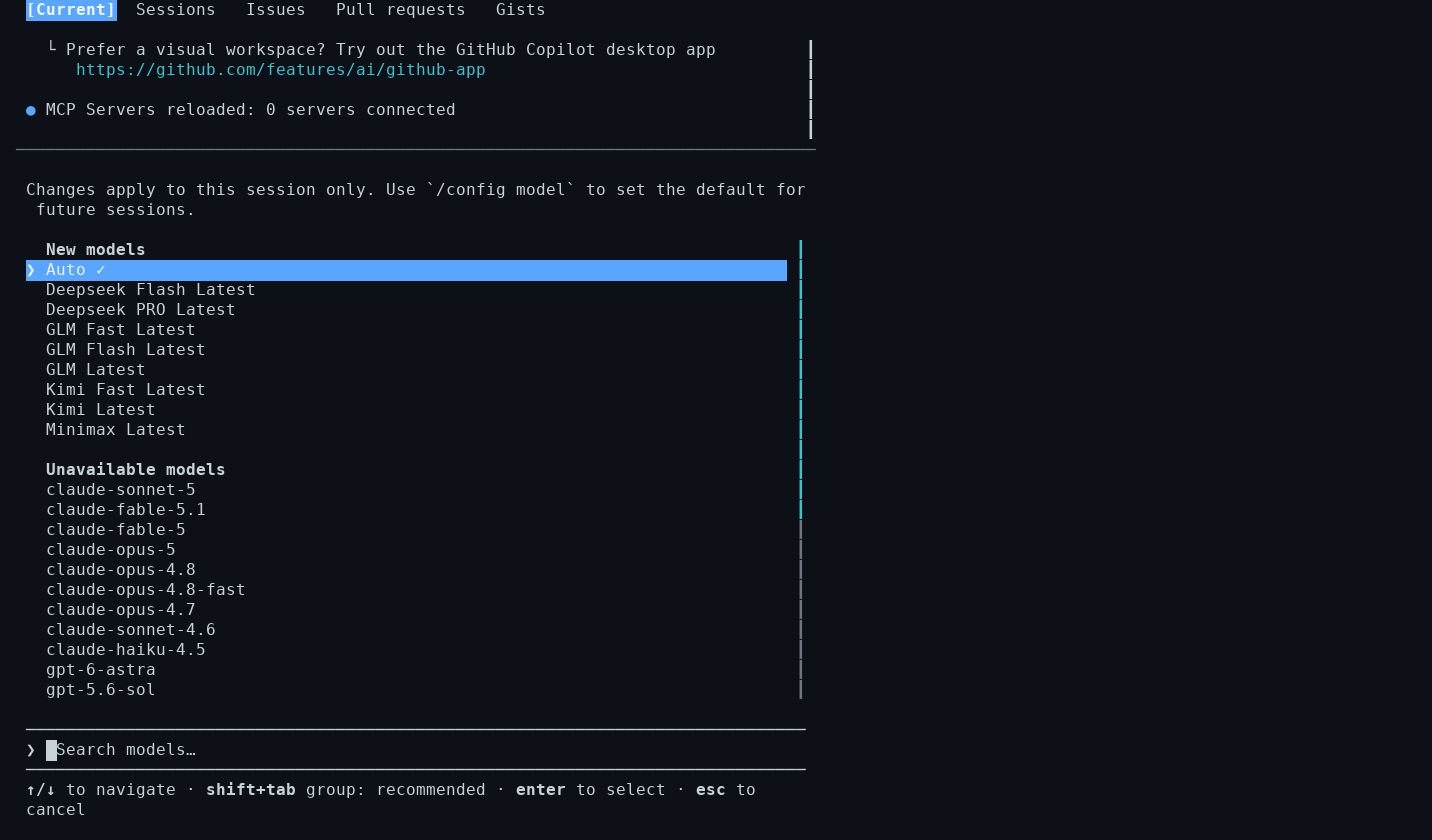 `off` restores `providers.json` from its snapshot, or deletes it if FireConnect created it. Use `--providers-path` for a non-default location.
```json ~/.copilot/providers.json theme={null}
{
"providers": [
{
"name": "fireworks",
"type": "openai",
"wireApi": "completions",
"baseUrl": "https://api.fireworks.ai/inference/v1",
"apiKey": "fw_YOUR_FIREWORKS_API_KEY"
}
],
"models": [
{
"id": "glm-latest",
"provider": "fireworks",
"wireModel": "glm-latest",
"name": "GLM (Latest)",
"maxPromptTokens": 1048576,
"maxContextWindowTokens": 1048576,
"maxOutputTokens": 131072,
"capabilities": { "supports": { "reasoningEffort": true } }
}
]
}
```
```json ~/.copilot/settings.json theme={null}
{ "model": "fireworks/glm-latest" }
```
For a FireRouter route with Claude or GPT models, add a `headers` map to the provider, such as `"headers": { "x-anthropic-api-key": "sk-ant-..." }`, and use the router ID, such as `firerouter/opus`, as the model `id` and `wireModel`. FireConnect cannot add these routes to Copilot CLI yet. The [harness setup](/nexus/firerouter/setup#set-up-your-harness) generates the full file.
Use provider-prefixed model IDs such as `fireworks/glm-latest`. The CLI rejects a bare `glm-latest` and silently falls back to its configured model.
## DeepSeek Harness
OpenAI Chat Completions FireRouter with manual setup
DeepSeek's coding agent (`dsh`) runs named profiles, such as `tui`, `web`, and `headless`, under `$DSH_HOME`, which defaults to `~/.dsh`. Restart `dsh` after changing a profile.
```bash wrap theme={null}
fireconnect deepseek
fireconnect deepseek status
```
FireConnect writes a `fireworks` provider to `~/.dsh/settings.yaml` and snapshots it under `~/.fireconnect/deepseek/`. The default model is `auto`.
`dsh` 0.1.7 reads provider settings from each profile's
`cordis.patch.yml` and ignores `~/.dsh/settings.yaml`. If `dsh` still
uses its DeepSeek provider after you connect, use manual setup.
Create the profile folder once, then add a patch to it. Repeat for each profile you use.
```bash wrap theme={null}
dsh --profile tui --dump-config > /dev/null
```
```yaml ~/.dsh/profiles/tui/cordis.patch.yml theme={null}
- id: llm-pi-ai
config:
providers:
fireworks:
displayName: Fireworks
apiKeyEnv: FIREWORKS_API_KEY
api: openai-completions
baseURL: https://api.fireworks.ai/inference/v1
models:
- id: glm-latest
name: GLM (Latest)
reasoning: true
contextWindow: 1048576
maxTokens: 131072
- id: agent-default-model
config:
provider: fireworks
model: glm-latest
```
```bash wrap theme={null}
export FIREWORKS_API_KEY="fw_..."
dsh tui
```
For a FireRouter route with Claude or GPT models, add `headers` to the provider, such as `x-anthropic-api-key: sk-ant-...`, and use the router ID as the model. The [harness setup](/nexus/firerouter/setup#set-up-your-harness) generates the full patch.
`off` restores `providers.json` from its snapshot, or deletes it if FireConnect created it. Use `--providers-path` for a non-default location.
```json ~/.copilot/providers.json theme={null}
{
"providers": [
{
"name": "fireworks",
"type": "openai",
"wireApi": "completions",
"baseUrl": "https://api.fireworks.ai/inference/v1",
"apiKey": "fw_YOUR_FIREWORKS_API_KEY"
}
],
"models": [
{
"id": "glm-latest",
"provider": "fireworks",
"wireModel": "glm-latest",
"name": "GLM (Latest)",
"maxPromptTokens": 1048576,
"maxContextWindowTokens": 1048576,
"maxOutputTokens": 131072,
"capabilities": { "supports": { "reasoningEffort": true } }
}
]
}
```
```json ~/.copilot/settings.json theme={null}
{ "model": "fireworks/glm-latest" }
```
For a FireRouter route with Claude or GPT models, add a `headers` map to the provider, such as `"headers": { "x-anthropic-api-key": "sk-ant-..." }`, and use the router ID, such as `firerouter/opus`, as the model `id` and `wireModel`. FireConnect cannot add these routes to Copilot CLI yet. The [harness setup](/nexus/firerouter/setup#set-up-your-harness) generates the full file.
Use provider-prefixed model IDs such as `fireworks/glm-latest`. The CLI rejects a bare `glm-latest` and silently falls back to its configured model.
## DeepSeek Harness
OpenAI Chat Completions FireRouter with manual setup
DeepSeek's coding agent (`dsh`) runs named profiles, such as `tui`, `web`, and `headless`, under `$DSH_HOME`, which defaults to `~/.dsh`. Restart `dsh` after changing a profile.
```bash wrap theme={null}
fireconnect deepseek
fireconnect deepseek status
```
FireConnect writes a `fireworks` provider to `~/.dsh/settings.yaml` and snapshots it under `~/.fireconnect/deepseek/`. The default model is `auto`.
`dsh` 0.1.7 reads provider settings from each profile's
`cordis.patch.yml` and ignores `~/.dsh/settings.yaml`. If `dsh` still
uses its DeepSeek provider after you connect, use manual setup.
Create the profile folder once, then add a patch to it. Repeat for each profile you use.
```bash wrap theme={null}
dsh --profile tui --dump-config > /dev/null
```
```yaml ~/.dsh/profiles/tui/cordis.patch.yml theme={null}
- id: llm-pi-ai
config:
providers:
fireworks:
displayName: Fireworks
apiKeyEnv: FIREWORKS_API_KEY
api: openai-completions
baseURL: https://api.fireworks.ai/inference/v1
models:
- id: glm-latest
name: GLM (Latest)
reasoning: true
contextWindow: 1048576
maxTokens: 131072
- id: agent-default-model
config:
provider: fireworks
model: glm-latest
```
```bash wrap theme={null}
export FIREWORKS_API_KEY="fw_..."
dsh tui
```
For a FireRouter route with Claude or GPT models, add `headers` to the provider, such as `x-anthropic-api-key: sk-ant-...`, and use the router ID as the model. The [harness setup](/nexus/firerouter/setup#set-up-your-harness) generates the full patch.