> ## Documentation Index
> Fetch the complete documentation index at: https://docs.fireworks.ai/llms.txt
> Use this file to discover all available pages before exploring further.
> ## Agent Instructions
> For Fireworks Nexus, start at https://docs.fireworks.ai/nexus.
> Use https://docs.fireworks.ai/nexus/quickstart for coding harnesses, custom agents, APIs, SDKs, and LLM gateways.
> Use https://docs.fireworks.ai/nexus/firerouter for how model routers work, the supported model list, composition, closed-model credentials, and pricing.
> Prefer canonical short model IDs such as firerouter/opus. In LiteLLM litellm_params.model, use the full path fireworks_ai/accounts/fireworks/routers/firerouter/opus.
> Family names such as opus track the latest evaluated family version; do not describe them as fixed model versions.
# Spend Limits
> Set account, group, and user-specific spend limits to cap per-user spend on supported Fireworks serverless models.
Set per-user spend caps for [supported serverless models](#supported-models). Fireworks counts a user's spend on those models toward that user's effective limit across the account.
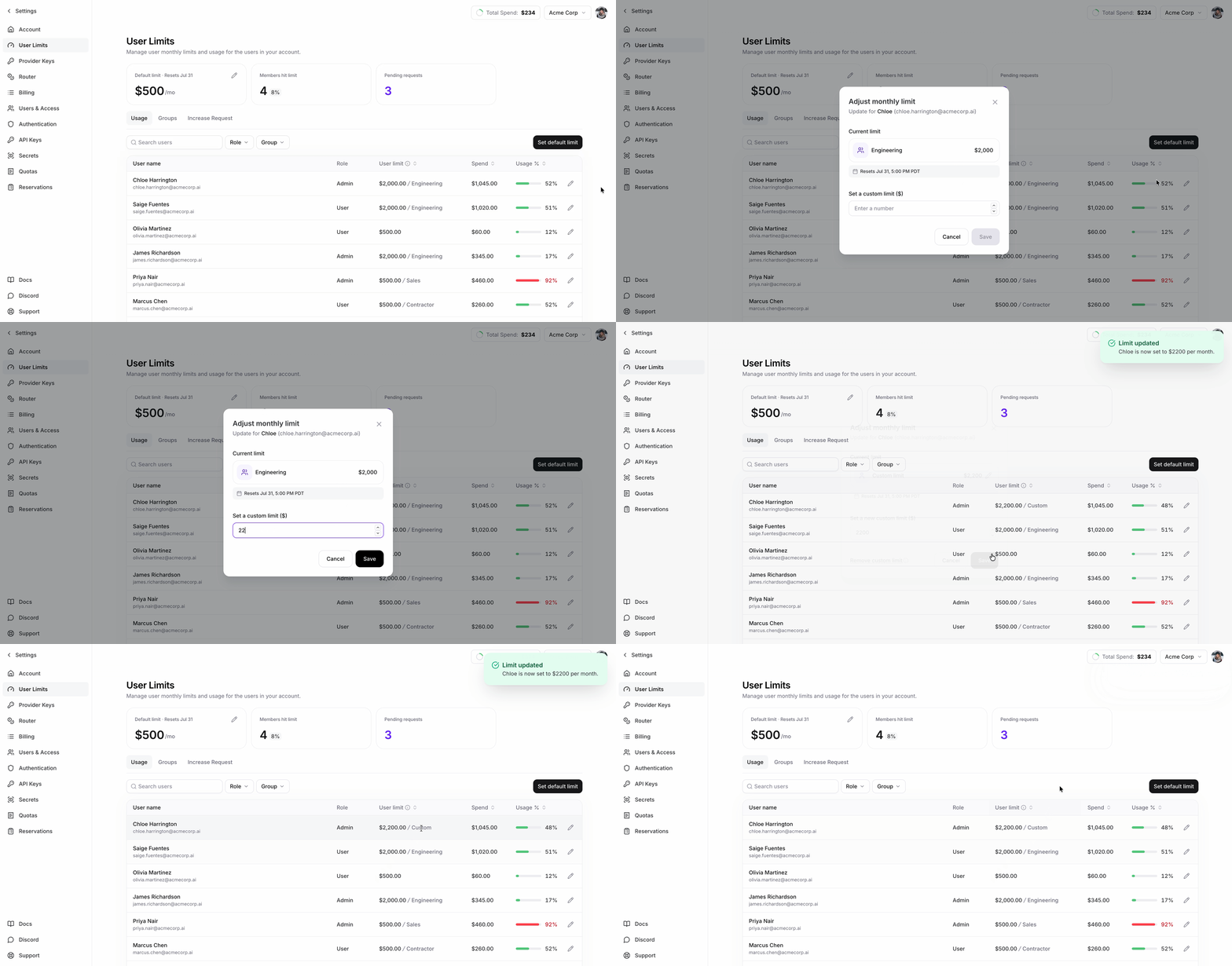
Manage limits on the [User Limits](#manage-limits-and-monitor-spend) page under **Settings**.
Per-user usage limits are available on request — contact Fireworks to enable them. Only admins can change limits, and group limits additionally require [SCIM group sync](/accounts/sso#group-provisioning).
## Set defaults, group limits, and exceptions
| Control | Use it for |
| ------------------- | -------------------------------------------------------------------------------------------------------------------------------------------------------------------------------------------------------------- |
| **Account default** | The per-user ceiling for anyone without a group limit or user override. Productivity-only accounts receive a \$100 default when limits are provisioned. Other accounts have no default until an admin sets one |
| **Group limit** | A reusable per-user ceiling for SCIM-synced teams |
| **User override** | An exception for one person |
A user override takes precedence. If there is no override, the highest limit among the user's assigned groups applies. If there are no group limits, the account default applies.
 ### Limit precedence
A user's effective limit is resolved in this order:
1. Their **per-user override**, if they have one.
2. Otherwise, the **highest** cap among the group limits assigned to their groups. A group limit *below* the account default still wins: a group cap replaces the default rather than competing with it.
3. Otherwise, the **account default cap**.
A user with no override, no group limit, and no account default has no cap. Use a per-user override when someone needs a cap their group membership won't produce.
## Group limits
A group limit is a reusable per-user cap. It does not create a shared group budget. The User Limits page calls these **limit options**.
On a $500 group limit, each member can spend up to $500. The members do not share \$500.
`firectl` and the REST API call this resource a *group usage limit tier*.
### Where groups come from
Groups come from your identity provider through the group provisioning described in [Custom SSO](/accounts/sso#group-provisioning); that is the only way to create one. Groups and their membership are read-only in Fireworks; add, rename, delete, and populate them in your directory. The limit assignment is the one part you set in Fireworks.
### Group-limit constraints
| Constraint | Behavior |
| --------------------- | ------------------------------------------------------------------------------------------------------------------------------------------- |
| **Maximum** | An account can define at most **9 group limits**. The User Limits page shows 10 slots because the account default occupies one |
| **Distinct amounts** | Each group limit must use a different amount. A group limit may equal the account default |
| **Valid amounts** | Amounts must be non-negative USD values. A **\$0** limit blocks serverless spend after enforcement refreshes |
| **Scope** | A group limit stores an amount only. Each user still resolves to one effective limit |
| **Unassigned groups** | An unassigned group contributes no cap. Its members fall back to another assigned group or the account default |
| **Deletion** | `firectl` and the REST API reject deletion while groups remain assigned. The User Limits page reassigns those groups to the account default |
## Supported models
Per-user metering applies to serverless models included in the account's metering configuration. Dedicated deployments are not included. All amounts are in USD. Usage resets at the start of each billing period.
## Manage limits and monitor spend
The User Limits page shows current-period spend, effective limit, and limit source for each user. Admins can set the account default, manage group limits, and set user overrides.
## What happens when a user reaches the limit
* Spend counted toward the limit resets at the start of each billing period.
* After a user reaches their effective limit, requests to supported Fireworks serverless models return HTTP `402`.
* Raising the limit or starting a new billing period allows requests to supported Fireworks serverless models again after enforcement refreshes.
* Enforcement refreshes about once per minute, so changes can take 1–2 minutes in practice.
| Condition | Result |
| ------------------------------------------------------------------------- | ------------------------------------------------------------------------------------------------------------------------ |
| **A user reaches their effective limit** | Further requests to supported serverless models return HTTP `402` until the limit is raised or the billing period resets |
| **The billing period resets** | Current-period usage and blocks reset |
| **A cap is set to `$0`** | The user can make no supported serverless spend after enforcement refreshes |
| **A limit or group membership changes** | The change takes effect during the next enforcement refresh |
| **A productivity-only account is still being created and has no default** | Serverless requests return HTTP `412` until provisioning creates the \$100 default |
Enforcement refreshes about once per minute. Blocking, unblocking, cap changes, group assignments, and directory membership changes can therefore take 1–2 minutes.
Limits count a user's supported serverless usage across the account. Dedicated deployment usage is not included.
## Permissions
| Action | Account admin | Member |
| -------------------------------------------------------- | ------------: | -----: |
| View account-level limits and group assignments | Yes | Yes |
| View own usage and effective limit | Yes | Yes |
| View every user's usage and limits | Yes | No |
| List all users | Yes | No |
| Change defaults, group limits, assignments, or overrides | Yes | No |
The commands below identify any narrower permissions for individual records.
## Using `firectl`
### Account-level
```bash wrap theme={null}
# View the account default cap and account-wide usage: any member
firectl usage-limits get
# Update the default per-user cap: admin only
firectl usage-limits update --default-user-limit=200
```
### Defining group limits
```bash wrap theme={null}
# List the account's group limits: any member
firectl usage-limits group-tier list
# Define a group limit: admin only
firectl usage-limits group-tier create contractors --limit=100 --display-name="Contractors"
# View one group limit: any member
firectl usage-limits group-tier get contractors
# Update this limit for every assigned group: admin only
firectl usage-limits group-tier update contractors --limit=250
# Rename it: admin only
firectl usage-limits group-tier update contractors --display-name="Contractors (2026)"
# Delete it: admin only, and only once no group is assigned
firectl usage-limits group-tier delete contractors
```
### Group assignments
```bash wrap theme={null}
# List every group's limit assignment, unassigned groups included: any member
firectl usage-limits group list
# View a single group's assignment: any member
firectl usage-limits group get platform-team
# Assign a group limit to a group: admin only
firectl usage-limits group set platform-team --group-usage-limit-tier=contractors
# Clear the assignment, so the group contributes no cap: admin only
firectl usage-limits group unset platform-team
```
Every command accepts either a bare ID or a full resource name. For example:
```bash wrap theme={null}
firectl usage-limits group set accounts/my-account/groups/platform-team \
--group-usage-limit-tier=accounts/my-account/groupUsageLimitTiers/contractors
```
This is equivalent to the short form above.
### Per-user
```bash wrap theme={null}
# List every user with their usage, effective limit, and override: admin only
firectl usage-limits user list
# View a single user: admin, or that user viewing their own
firectl usage-limits user get
# Give a user their own cap, overriding groups and the account default: admin only
firectl usage-limits user set --limit=500
# Remove a user's override, reverting them to their group cap or the account default: admin only
firectl usage-limits user unset
```
A user record contains:
| Field | Meaning |
| ----------------- | ------------------------------------------------------------------- |
| `used` | Current-period spend |
| `effective_limit` | The cap selected by the [precedence rules](#limit-precedence) |
| `limit_source` | `USER_OVERRIDE`, `GROUP_ASSIGNMENT`, or `ACCOUNT_DEFAULT` |
| `limit_groups` | For a group-derived cap, the groups assigned at the winning amount |
| `override` | The user's per-user override, if set |
| `exceeded_until` | When the current block ends. Present only while the user is blocked |
An override wins outright, so it is also how you lower a single user below their group's limit. Unsetting it resolves the limit again: the highest assigned group cap, then the account default, or no cap if neither exists. Account admins cannot clear the account default.
## Using the REST API
Create requests use `POST`, updates use `PATCH`, and deletions use `DELETE`. The update examples below pass `updateMask` explicitly using field names from the API schema. If you omit it, the mask is derived from the fields in your request body.
### Read limits
```bash wrap theme={null}
# Account-level usage limits: any member
curl -H "Authorization: Bearer $FIREWORKS_API_KEY" \
https://api.fireworks.ai/v1/accounts//usageLimits
# A single user's usage limits: admin, or that user
curl -H "Authorization: Bearer $FIREWORKS_API_KEY" \
https://api.fireworks.ai/v1/accounts//users//usageLimits
# All users in the account: admin only
curl -H "Authorization: Bearer $FIREWORKS_API_KEY" \
https://api.fireworks.ai/v1/accounts//userUsageLimits
# The account's group limits: any member
curl -H "Authorization: Bearer $FIREWORKS_API_KEY" \
https://api.fireworks.ai/v1/accounts//groupUsageLimitTiers
# Every group's limit assignment: any member
curl -H "Authorization: Bearer $FIREWORKS_API_KEY" \
https://api.fireworks.ai/v1/accounts//groupUsageLimits
# One group's limit assignment: any member
curl -H "Authorization: Bearer $FIREWORKS_API_KEY" \
https://api.fireworks.ai/v1/accounts//groups//usageLimits
```
### Manage group limits (admin only)
Group-limit create and update requests use [`google.type.Money`](https://github.com/googleapis/googleapis/blob/master/google/type/money.proto). Set `currencyCode` to `USD`; `units` contains whole dollars.
```bash wrap theme={null}
curl -X POST \
-H "Authorization: Bearer $FIREWORKS_API_KEY" \
-H "Content-Type: application/json" \
"https://api.fireworks.ai/v1/accounts//groupUsageLimitTiers?groupUsageLimitTierId=contractors" \
-d '{
"displayName": "Contractors",
"limit": {"currencyCode": "USD", "units": "100"}
}'
```
```bash wrap theme={null}
# Update the limit: changes the cap for every assigned group
curl -X PATCH \
-H "Authorization: Bearer $FIREWORKS_API_KEY" \
-H "Content-Type: application/json" \
"https://api.fireworks.ai/v1/accounts//groupUsageLimitTiers/contractors?updateMask=limit" \
-d '{"limit": {"currencyCode": "USD", "units": "250"}}'
```
```bash wrap theme={null}
# Delete the group limit: rejected while any group is still assigned to it
curl -X DELETE -H "Authorization: Bearer $FIREWORKS_API_KEY" \
https://api.fireworks.ai/v1/accounts//groupUsageLimitTiers/contractors
```
### Assign a group limit to a group (admin only)
Assigning and clearing are both updates of the group's usage-limits resource; there is no create or delete.
```bash wrap theme={null}
# Assign
curl -X PATCH \
-H "Authorization: Bearer $FIREWORKS_API_KEY" \
-H "Content-Type: application/json" \
"https://api.fireworks.ai/v1/accounts//groups//usageLimits?updateMask=group_usage_limit_tier" \
-d '{"groupUsageLimitTier": "accounts//groupUsageLimitTiers/contractors"}'
# Clear: an empty value removes the group's cap
curl -X PATCH \
-H "Authorization: Bearer $FIREWORKS_API_KEY" \
-H "Content-Type: application/json" \
"https://api.fireworks.ai/v1/accounts//groups//usageLimits?updateMask=group_usage_limit_tier" \
-d '{"groupUsageLimitTier": ""}'
```
### Update account and user limits (admin only)
* `PATCH /v1/accounts//usageLimits` to update `default_user_limit` (account admins cannot clear it)
* `PATCH /v1/accounts//users//usageLimits` to set `limit_override` (an unset value removes the override)
## Approved increase requests
If an admin approves an amount above the user's current effective limit, Fireworks creates a per-user override at that amount. Approval never lowers the user's effective limit.
### Limit precedence
A user's effective limit is resolved in this order:
1. Their **per-user override**, if they have one.
2. Otherwise, the **highest** cap among the group limits assigned to their groups. A group limit *below* the account default still wins: a group cap replaces the default rather than competing with it.
3. Otherwise, the **account default cap**.
A user with no override, no group limit, and no account default has no cap. Use a per-user override when someone needs a cap their group membership won't produce.
## Group limits
A group limit is a reusable per-user cap. It does not create a shared group budget. The User Limits page calls these **limit options**.
On a $500 group limit, each member can spend up to $500. The members do not share \$500.
`firectl` and the REST API call this resource a *group usage limit tier*.
### Where groups come from
Groups come from your identity provider through the group provisioning described in [Custom SSO](/accounts/sso#group-provisioning); that is the only way to create one. Groups and their membership are read-only in Fireworks; add, rename, delete, and populate them in your directory. The limit assignment is the one part you set in Fireworks.
### Group-limit constraints
| Constraint | Behavior |
| --------------------- | ------------------------------------------------------------------------------------------------------------------------------------------- |
| **Maximum** | An account can define at most **9 group limits**. The User Limits page shows 10 slots because the account default occupies one |
| **Distinct amounts** | Each group limit must use a different amount. A group limit may equal the account default |
| **Valid amounts** | Amounts must be non-negative USD values. A **\$0** limit blocks serverless spend after enforcement refreshes |
| **Scope** | A group limit stores an amount only. Each user still resolves to one effective limit |
| **Unassigned groups** | An unassigned group contributes no cap. Its members fall back to another assigned group or the account default |
| **Deletion** | `firectl` and the REST API reject deletion while groups remain assigned. The User Limits page reassigns those groups to the account default |
## Supported models
Per-user metering applies to serverless models included in the account's metering configuration. Dedicated deployments are not included. All amounts are in USD. Usage resets at the start of each billing period.
## Manage limits and monitor spend
The User Limits page shows current-period spend, effective limit, and limit source for each user. Admins can set the account default, manage group limits, and set user overrides.
## What happens when a user reaches the limit
* Spend counted toward the limit resets at the start of each billing period.
* After a user reaches their effective limit, requests to supported Fireworks serverless models return HTTP `402`.
* Raising the limit or starting a new billing period allows requests to supported Fireworks serverless models again after enforcement refreshes.
* Enforcement refreshes about once per minute, so changes can take 1–2 minutes in practice.
| Condition | Result |
| ------------------------------------------------------------------------- | ------------------------------------------------------------------------------------------------------------------------ |
| **A user reaches their effective limit** | Further requests to supported serverless models return HTTP `402` until the limit is raised or the billing period resets |
| **The billing period resets** | Current-period usage and blocks reset |
| **A cap is set to `$0`** | The user can make no supported serverless spend after enforcement refreshes |
| **A limit or group membership changes** | The change takes effect during the next enforcement refresh |
| **A productivity-only account is still being created and has no default** | Serverless requests return HTTP `412` until provisioning creates the \$100 default |
Enforcement refreshes about once per minute. Blocking, unblocking, cap changes, group assignments, and directory membership changes can therefore take 1–2 minutes.
Limits count a user's supported serverless usage across the account. Dedicated deployment usage is not included.
## Permissions
| Action | Account admin | Member |
| -------------------------------------------------------- | ------------: | -----: |
| View account-level limits and group assignments | Yes | Yes |
| View own usage and effective limit | Yes | Yes |
| View every user's usage and limits | Yes | No |
| List all users | Yes | No |
| Change defaults, group limits, assignments, or overrides | Yes | No |
The commands below identify any narrower permissions for individual records.
## Using `firectl`
### Account-level
```bash wrap theme={null}
# View the account default cap and account-wide usage: any member
firectl usage-limits get
# Update the default per-user cap: admin only
firectl usage-limits update --default-user-limit=200
```
### Defining group limits
```bash wrap theme={null}
# List the account's group limits: any member
firectl usage-limits group-tier list
# Define a group limit: admin only
firectl usage-limits group-tier create contractors --limit=100 --display-name="Contractors"
# View one group limit: any member
firectl usage-limits group-tier get contractors
# Update this limit for every assigned group: admin only
firectl usage-limits group-tier update contractors --limit=250
# Rename it: admin only
firectl usage-limits group-tier update contractors --display-name="Contractors (2026)"
# Delete it: admin only, and only once no group is assigned
firectl usage-limits group-tier delete contractors
```
### Group assignments
```bash wrap theme={null}
# List every group's limit assignment, unassigned groups included: any member
firectl usage-limits group list
# View a single group's assignment: any member
firectl usage-limits group get platform-team
# Assign a group limit to a group: admin only
firectl usage-limits group set platform-team --group-usage-limit-tier=contractors
# Clear the assignment, so the group contributes no cap: admin only
firectl usage-limits group unset platform-team
```
Every command accepts either a bare ID or a full resource name. For example:
```bash wrap theme={null}
firectl usage-limits group set accounts/my-account/groups/platform-team \
--group-usage-limit-tier=accounts/my-account/groupUsageLimitTiers/contractors
```
This is equivalent to the short form above.
### Per-user
```bash wrap theme={null}
# List every user with their usage, effective limit, and override: admin only
firectl usage-limits user list
# View a single user: admin, or that user viewing their own
firectl usage-limits user get
# Give a user their own cap, overriding groups and the account default: admin only
firectl usage-limits user set --limit=500
# Remove a user's override, reverting them to their group cap or the account default: admin only
firectl usage-limits user unset
```
A user record contains:
| Field | Meaning |
| ----------------- | ------------------------------------------------------------------- |
| `used` | Current-period spend |
| `effective_limit` | The cap selected by the [precedence rules](#limit-precedence) |
| `limit_source` | `USER_OVERRIDE`, `GROUP_ASSIGNMENT`, or `ACCOUNT_DEFAULT` |
| `limit_groups` | For a group-derived cap, the groups assigned at the winning amount |
| `override` | The user's per-user override, if set |
| `exceeded_until` | When the current block ends. Present only while the user is blocked |
An override wins outright, so it is also how you lower a single user below their group's limit. Unsetting it resolves the limit again: the highest assigned group cap, then the account default, or no cap if neither exists. Account admins cannot clear the account default.
## Using the REST API
Create requests use `POST`, updates use `PATCH`, and deletions use `DELETE`. The update examples below pass `updateMask` explicitly using field names from the API schema. If you omit it, the mask is derived from the fields in your request body.
### Read limits
```bash wrap theme={null}
# Account-level usage limits: any member
curl -H "Authorization: Bearer $FIREWORKS_API_KEY" \
https://api.fireworks.ai/v1/accounts//usageLimits
# A single user's usage limits: admin, or that user
curl -H "Authorization: Bearer $FIREWORKS_API_KEY" \
https://api.fireworks.ai/v1/accounts//users//usageLimits
# All users in the account: admin only
curl -H "Authorization: Bearer $FIREWORKS_API_KEY" \
https://api.fireworks.ai/v1/accounts//userUsageLimits
# The account's group limits: any member
curl -H "Authorization: Bearer $FIREWORKS_API_KEY" \
https://api.fireworks.ai/v1/accounts//groupUsageLimitTiers
# Every group's limit assignment: any member
curl -H "Authorization: Bearer $FIREWORKS_API_KEY" \
https://api.fireworks.ai/v1/accounts//groupUsageLimits
# One group's limit assignment: any member
curl -H "Authorization: Bearer $FIREWORKS_API_KEY" \
https://api.fireworks.ai/v1/accounts//groups//usageLimits
```
### Manage group limits (admin only)
Group-limit create and update requests use [`google.type.Money`](https://github.com/googleapis/googleapis/blob/master/google/type/money.proto). Set `currencyCode` to `USD`; `units` contains whole dollars.
```bash wrap theme={null}
curl -X POST \
-H "Authorization: Bearer $FIREWORKS_API_KEY" \
-H "Content-Type: application/json" \
"https://api.fireworks.ai/v1/accounts//groupUsageLimitTiers?groupUsageLimitTierId=contractors" \
-d '{
"displayName": "Contractors",
"limit": {"currencyCode": "USD", "units": "100"}
}'
```
```bash wrap theme={null}
# Update the limit: changes the cap for every assigned group
curl -X PATCH \
-H "Authorization: Bearer $FIREWORKS_API_KEY" \
-H "Content-Type: application/json" \
"https://api.fireworks.ai/v1/accounts//groupUsageLimitTiers/contractors?updateMask=limit" \
-d '{"limit": {"currencyCode": "USD", "units": "250"}}'
```
```bash wrap theme={null}
# Delete the group limit: rejected while any group is still assigned to it
curl -X DELETE -H "Authorization: Bearer $FIREWORKS_API_KEY" \
https://api.fireworks.ai/v1/accounts//groupUsageLimitTiers/contractors
```
### Assign a group limit to a group (admin only)
Assigning and clearing are both updates of the group's usage-limits resource; there is no create or delete.
```bash wrap theme={null}
# Assign
curl -X PATCH \
-H "Authorization: Bearer $FIREWORKS_API_KEY" \
-H "Content-Type: application/json" \
"https://api.fireworks.ai/v1/accounts//groups//usageLimits?updateMask=group_usage_limit_tier" \
-d '{"groupUsageLimitTier": "accounts//groupUsageLimitTiers/contractors"}'
# Clear: an empty value removes the group's cap
curl -X PATCH \
-H "Authorization: Bearer $FIREWORKS_API_KEY" \
-H "Content-Type: application/json" \
"https://api.fireworks.ai/v1/accounts//groups//usageLimits?updateMask=group_usage_limit_tier" \
-d '{"groupUsageLimitTier": ""}'
```
### Update account and user limits (admin only)
* `PATCH /v1/accounts//usageLimits` to update `default_user_limit` (account admins cannot clear it)
* `PATCH /v1/accounts//users//usageLimits` to set `limit_override` (an unset value removes the override)
## Approved increase requests
If an admin approves an amount above the user's current effective limit, Fireworks creates a per-user override at that amount. Approval never lowers the user's effective limit.