> ## Documentation Index
> Fetch the complete documentation index at: https://docs.fireworks.ai/llms.txt
> Use this file to discover all available pages before exploring further.
# Developing Evaluators
The Build SDK natively integrates
[reward-kit](https://github.com/fw-ai-external/reward-kit) to make it easy to
develop Evaluators for [RFT](/fine-tuning/reinforcement-fine-tuning-models) in Python.
The reward-kit functionality is available as an optional dependency. You'll need to install `fireworks-ai[reward-kit]` to use the evaluator features described in this guide.
## Prerequisites
You can install the Fireworks Build SDK using pip. For developing evaluators, you'll need to install the SDK with the reward-kit optional dependency:
```bash theme={null}
pip install --upgrade fireworks-ai[reward-kit]
```
Make sure to set the `FIREWORKS_API_KEY` environment variable to your Fireworks API key:
```bash theme={null}
export FIREWORKS_API_KEY=
```
You can create an API key in the [Fireworks AI web UI](https://app.fireworks.ai/settings/users/api-keys) or by installing the [firectl](/tools-sdks/firectl/firectl) CLI tool and running:
```bash theme={null}
firectl signin
firectl api-key create --key-name
```
## Your first evaluator
For this tutorial, we'll create a new project using `uv`.
```shell theme={null}
$ uv init
Initialized project `my-project`
$ uv add fireworks-ai[reward-kit]
```
You should now have a project with a `pyproject.toml` file and a `uv.lock` file.
```shell theme={null}
% tree
.
├── main.py
├── pyproject.toml
├── README.md
└── uv.lock
1 directory, 4 files
```
To create your first evaluator, create a new file at `my_first_evaluator/main.py`:
Evaluators must be in their own directory because the Build SDK automatically
recursively packages all sibling and child files from the directory containing
the imported reward function.
```shell theme={null}
mkdir -p my_first_evaluator
touch my_first_evaluator/main.py
```
Add the following code to `my_first_evaluator/main.py`:
```python my_first_evaluator/main.py theme={null}
from fireworks import reward_function
@reward_function(id="my-first-evaluator")
def evaluate(messages, **kwargs):
"""
This is a simple reward function that returns a score of 1.0 if the message contains the word "fireworks" and 0.0 otherwise.
"""
# Extract the content from the messages structure
content = messages[0]["content"]
score = 1.0 if "fireworks" in content else 0.0
return {"score": score}
```
To test your evaluator locally, you can simply call the function itself. Replace the contents of `main.py` with the following code:
```python main.py theme={null}
from my_first_evaluator.main import evaluate
print(evaluate(messages=[{"role": "user", "content": "Hello, world!"}]))
print(evaluate(messages=[{"role": "user", "content": "Hello, fireworks!"}]))
```
Let's run the script and see what happens:
```shell theme={null}
% uv run python main.py
score=0.0 is_score_valid=True reason=None metrics={} step_outputs=None error=None
score=1.0 is_score_valid=True reason=None metrics={} step_outputs=None error=None
```
You should see that the first message returns a score of 0.0 and the second message returns a score of 1.0, showing that our evaluator is working as expected.
### Evaluating on a dataset
Now that we've created and tested our first evaluator, we can use it to evaluate
on Fireworks infrastructure using a dataset uploaded on Fireworks.
To do this, we'll create a
[Dataset](/tools-sdks/python-client/sdk-reference#dataset) object and call
`create_evaluation_job`. Create a new file called `run_first_evaluator.py` at
the root of your project and add the following code:
```python run_first_evaluator.py theme={null}
from my_first_evaluator.main import evaluate
from fireworks import Dataset
import random
dataset = Dataset.from_list(
data=[
{"messages": [{"role": "user", "content": "Hello, fireworks!" if random.random() < 0.5 else "Hello, world!"}]}
for _ in range(100)
]
)
job = dataset.create_evaluation_job(evaluate)
print(job.url)
job.wait_for_completion()
print(job.output_dataset.url)
```
Let's run the script and see what happens:
```shell theme={null}
% uv run python run_first_evaluator.py
https://app.fireworks.ai/dashboard/evaluation-jobs/wqfvyv90yzfv9q95
```
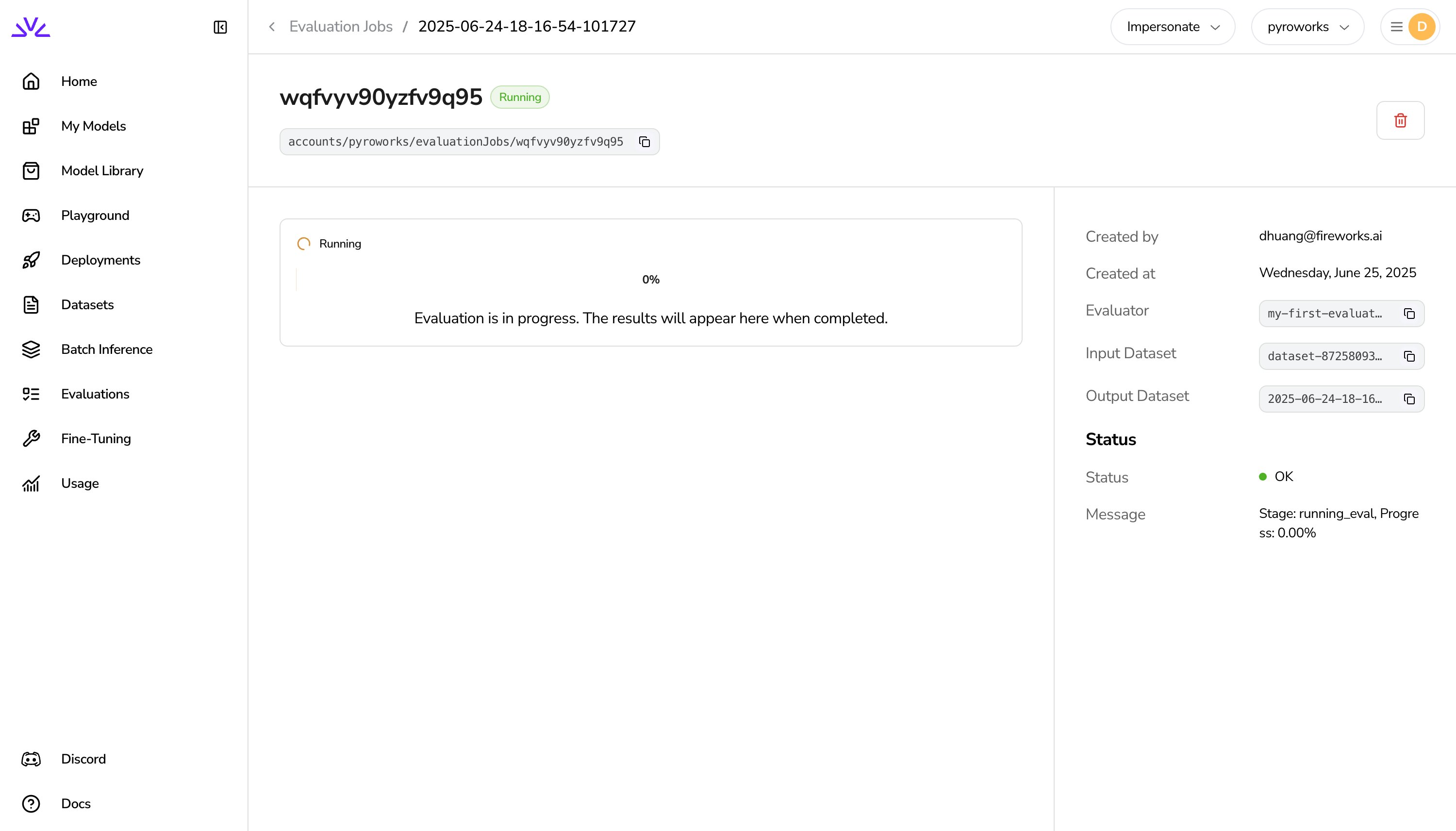
When the script first runs, you should see a URL for the evaluation job. You can
go to the URL to see the evaluation job in the Fireworks AI web UI.
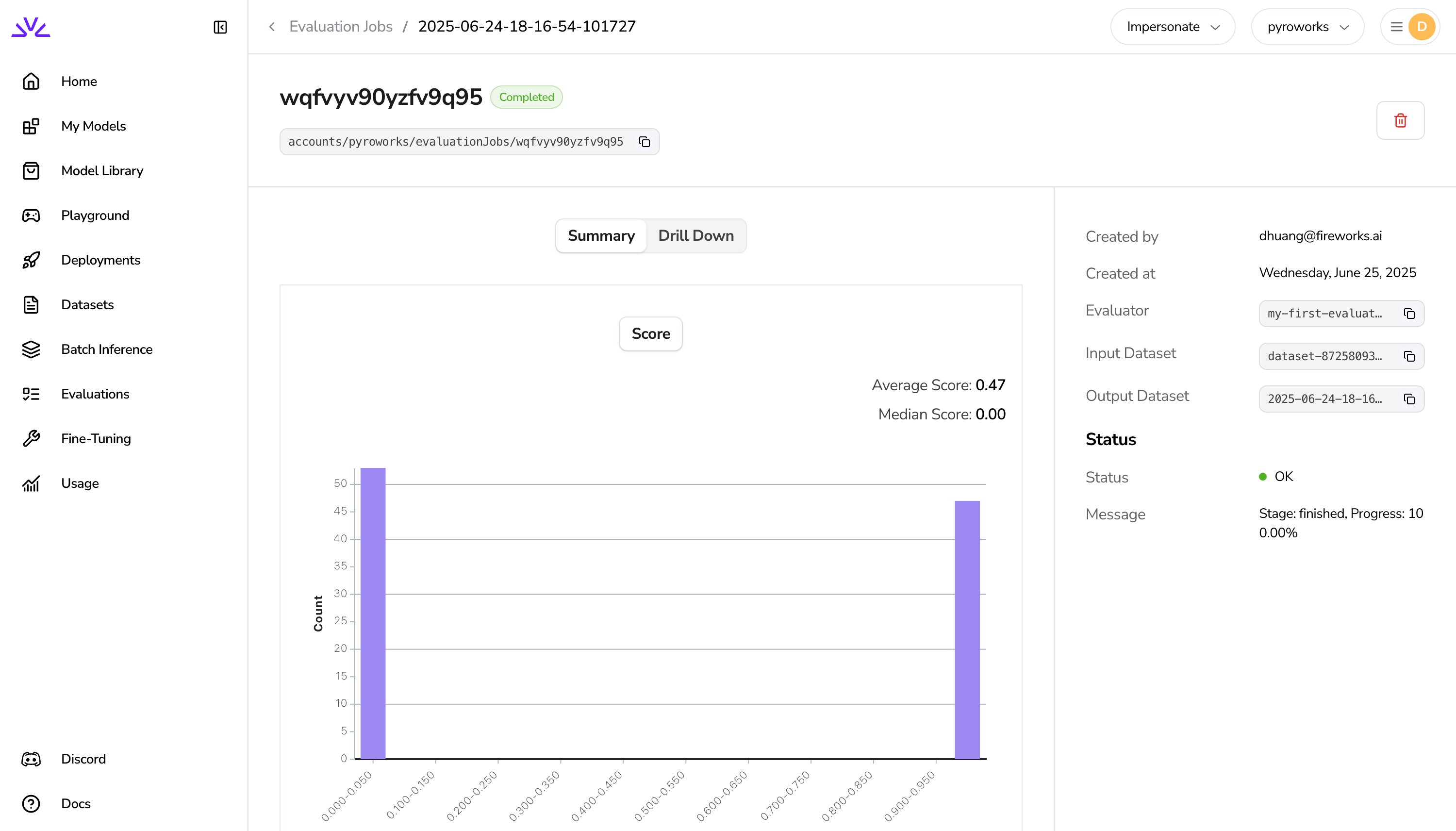
 After some time, the evaluation job will be completed and you should see a URL
for the output dataset. You can go to the URL to see the results in the
Fireworks AI web UI.
After some time, the evaluation job will be completed and you should see a URL
for the output dataset. You can go to the URL to see the results in the
Fireworks AI web UI.
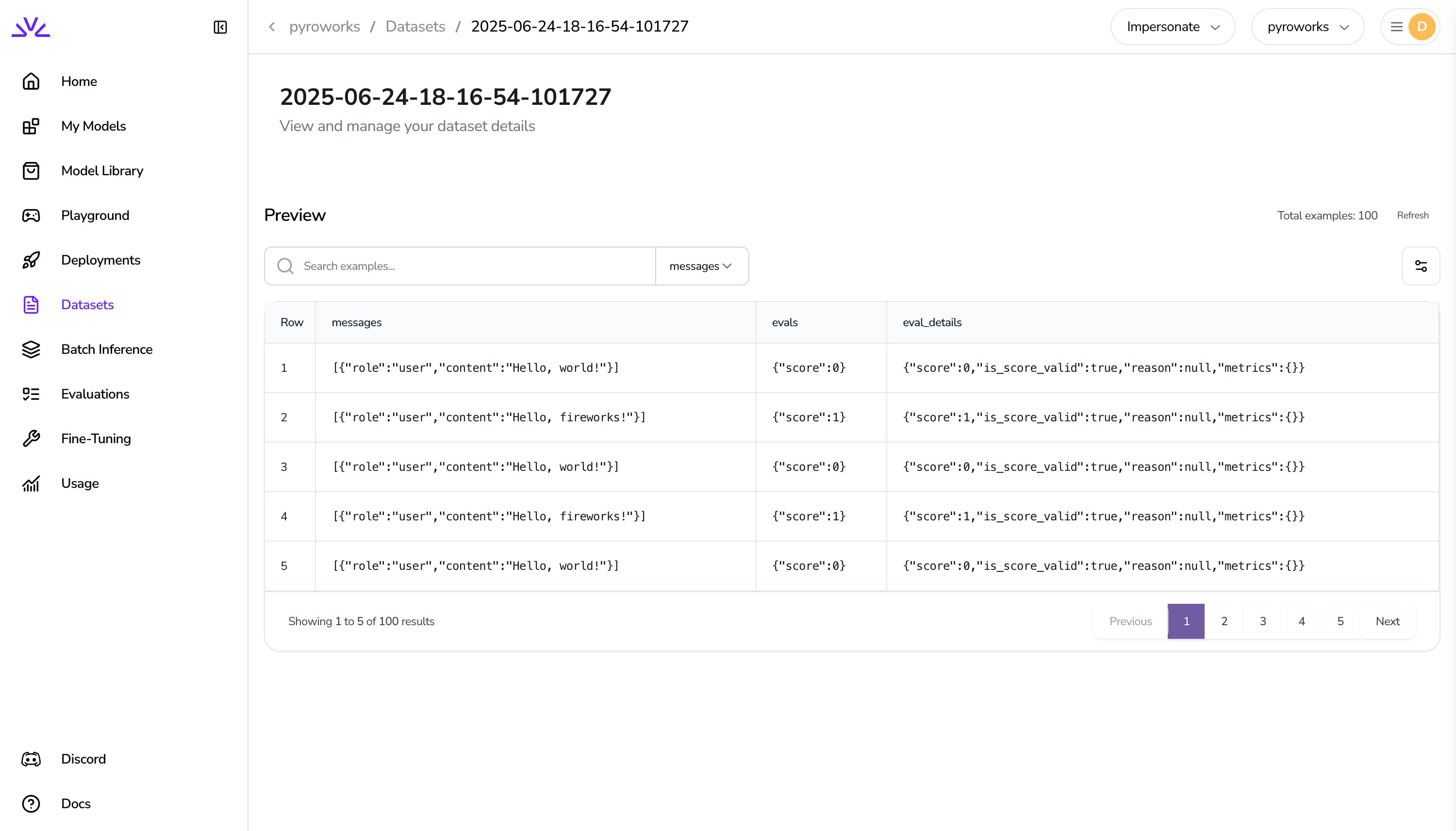
 After the job is completed, the script will also print the URL for the output
dataset.
```shell focus={3} theme={null}
% uv run python run_first_evaluator.py
https://app.fireworks.ai/dashboard/evaluation-jobs/wqfvyv90yzfv9q95
https://app.fireworks.ai/dashboard/datasets/2025-06-24-18-16-54-101727
```
You can go to the URL to see the output dataset in the Fireworks AI web UI.
After the job is completed, the script will also print the URL for the output
dataset.
```shell focus={3} theme={null}
% uv run python run_first_evaluator.py
https://app.fireworks.ai/dashboard/evaluation-jobs/wqfvyv90yzfv9q95
https://app.fireworks.ai/dashboard/datasets/2025-06-24-18-16-54-101727
```
You can go to the URL to see the output dataset in the Fireworks AI web UI.
 ## Creating your second evaluator
Let's create a more complex evaluator that imports a third-party library to calculate the score. Let's add the `textblob` library to our project:
```shell theme={null}
% uv add textblob
```
The Build SDK will automatically pick up dependencies found from `pyproject.toml`
or `requirements.txt` files in your project. Alternatively you can specify a
list of strings as you would in a `requirements.txt` file directly in the
`@reward_function` decorator itself.
Now, let's create a new evaluator under `my_second_evaluator/main.py`:
```shell theme={null}
% mkdir -p my_second_evaluator
% touch my_second_evaluator/main.py
```
Copy-paste the following code into `my_second_evaluator/main.py`:
```python my_second_evaluator/main.py theme={null}
from fireworks import reward_function
from textblob import TextBlob
@reward_function(id="my-second-evaluator")
def evaluate(messages, **kwargs):
"""
This is a reward function that demonstrates the use of third-party dependencies.
It returns a normalized score between 0 and 1.0 based on the sentiment polarity of the message.
"""
# Extract the content from the messages structure
content = messages[0]["content"]
# Use the third-party dependency (TextBlob) for sentiment analysis
blob = TextBlob(content)
sentiment_score = blob.sentiment.polarity # type: ignore
# Normalize sentiment score from [-1, 1] to [0, 1]
# sentiment_score ranges from -1 to 1, so we add 1 to get [0, 2], then divide by 2 to get [0, 1]
normalized_score = (sentiment_score + 1) / 2
# Ensure the score is clamped between 0 and 1
normalized_score = max(0.0, min(1.0, normalized_score))
# Return the format expected by the framework
return {"score": normalized_score}
```
Download the
[random\_phrases.jsonl](https://storage.googleapis.com/fireworks-public/tutorial/random_phrases.jsonl)
file and save it to the root of your project. The `random_phrases.jsonl` file
should be at the root of your project like this:
```shell highlight={9} theme={null}
% tree -I "__pycache__"
.
├── main.py
├── my_first_evaluator
│ └── main.py
├── my_second_evaluator
│ └── main.py
├── pyproject.toml
├── random_phrases.jsonl
├── README.md
├── run_first_evaluator.py
└── uv.lock
```
Create a new file called `run_second_evaluator.py` and add the following code:
```python run_second_evaluator.py theme={null}
from fireworks import Dataset
from my_second_evaluator.main import evaluate
dataset = Dataset.from_file("random_phrases.jsonl")
job = dataset.create_evaluation_job(evaluate)
print(job.url)
job.wait_for_completion()
print(job.output_dataset.url)
```
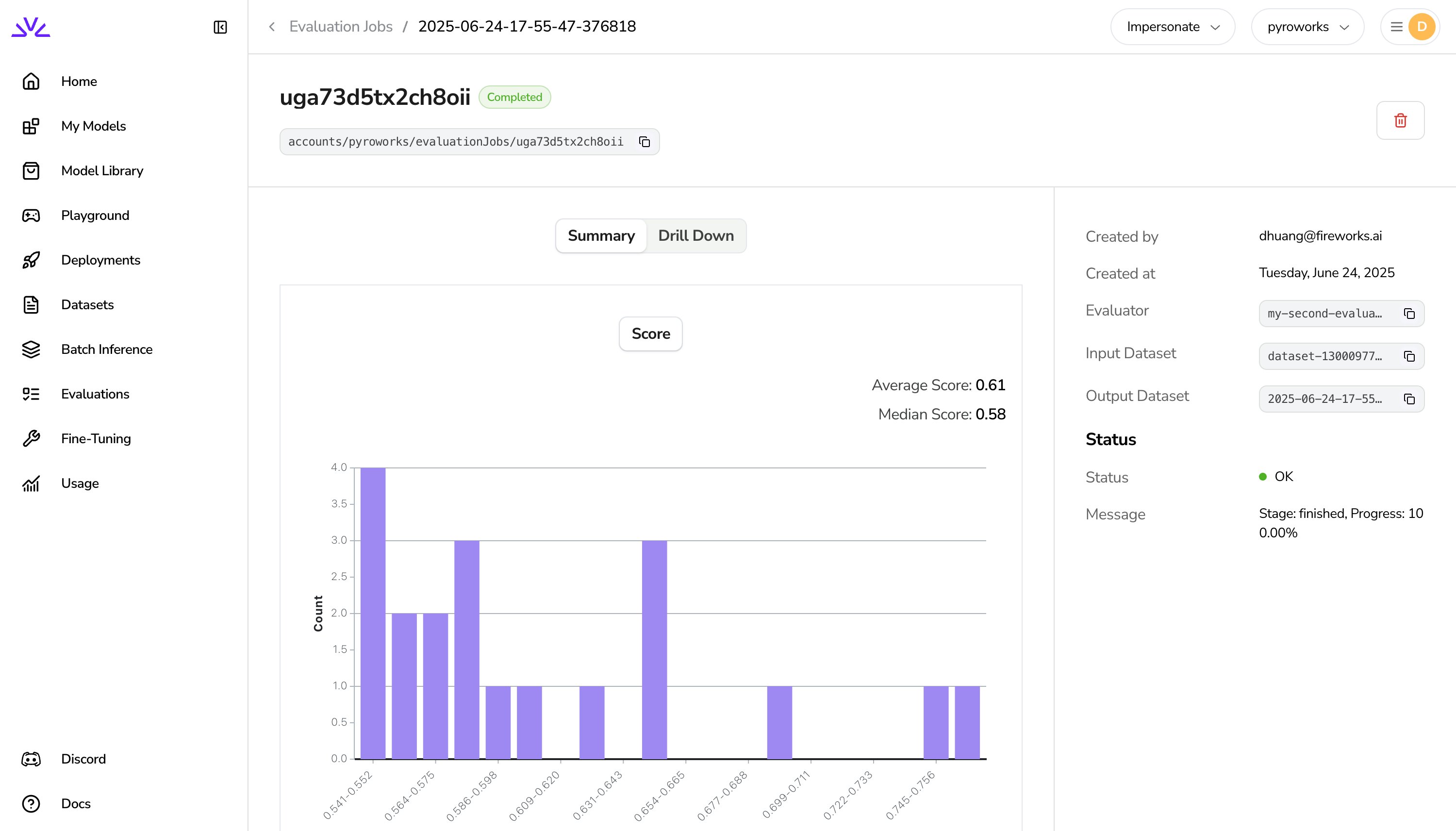
Once the script is done running, you can click on the URL for the evaluation job and see the results in the Fireworks AI web UI.
## Creating your second evaluator
Let's create a more complex evaluator that imports a third-party library to calculate the score. Let's add the `textblob` library to our project:
```shell theme={null}
% uv add textblob
```
The Build SDK will automatically pick up dependencies found from `pyproject.toml`
or `requirements.txt` files in your project. Alternatively you can specify a
list of strings as you would in a `requirements.txt` file directly in the
`@reward_function` decorator itself.
Now, let's create a new evaluator under `my_second_evaluator/main.py`:
```shell theme={null}
% mkdir -p my_second_evaluator
% touch my_second_evaluator/main.py
```
Copy-paste the following code into `my_second_evaluator/main.py`:
```python my_second_evaluator/main.py theme={null}
from fireworks import reward_function
from textblob import TextBlob
@reward_function(id="my-second-evaluator")
def evaluate(messages, **kwargs):
"""
This is a reward function that demonstrates the use of third-party dependencies.
It returns a normalized score between 0 and 1.0 based on the sentiment polarity of the message.
"""
# Extract the content from the messages structure
content = messages[0]["content"]
# Use the third-party dependency (TextBlob) for sentiment analysis
blob = TextBlob(content)
sentiment_score = blob.sentiment.polarity # type: ignore
# Normalize sentiment score from [-1, 1] to [0, 1]
# sentiment_score ranges from -1 to 1, so we add 1 to get [0, 2], then divide by 2 to get [0, 1]
normalized_score = (sentiment_score + 1) / 2
# Ensure the score is clamped between 0 and 1
normalized_score = max(0.0, min(1.0, normalized_score))
# Return the format expected by the framework
return {"score": normalized_score}
```
Download the
[random\_phrases.jsonl](https://storage.googleapis.com/fireworks-public/tutorial/random_phrases.jsonl)
file and save it to the root of your project. The `random_phrases.jsonl` file
should be at the root of your project like this:
```shell highlight={9} theme={null}
% tree -I "__pycache__"
.
├── main.py
├── my_first_evaluator
│ └── main.py
├── my_second_evaluator
│ └── main.py
├── pyproject.toml
├── random_phrases.jsonl
├── README.md
├── run_first_evaluator.py
└── uv.lock
```
Create a new file called `run_second_evaluator.py` and add the following code:
```python run_second_evaluator.py theme={null}
from fireworks import Dataset
from my_second_evaluator.main import evaluate
dataset = Dataset.from_file("random_phrases.jsonl")
job = dataset.create_evaluation_job(evaluate)
print(job.url)
job.wait_for_completion()
print(job.output_dataset.url)
```
Once the script is done running, you can click on the URL for the evaluation job and see the results in the Fireworks AI web UI.
 🎉 Congratulations! You've now created and evaluated your first two evaluators.
If you have any questions, please reach out to us on
[Discord](https://discord.gg/fireworks-ai).
🎉 Congratulations! You've now created and evaluated your first two evaluators.
If you have any questions, please reach out to us on
[Discord](https://discord.gg/fireworks-ai).