
Claude Code
Codex CLI, Codex app, and ChatGPT
OpenCode
Cursor IDE
VS Code
More harnesses
Pi, Copilot App and CLI, and DeepSeek Harness
Quick start
Install
Alternative installer
Alternative installer
Sign in
Connect a harness
claude with any harness from Coding Harnesses. cursor means Cursor IDE only; Cursor CLI is not supported.Restart and check
status shows the configured model and the Fireworks models in the picker.In Claude Code
When you select FireRouter in Claude Code, the header shows the active profile:
Claude Code connected through FireRouter
/model to choose FireRouter, an open-model router, or a Fireworks model:
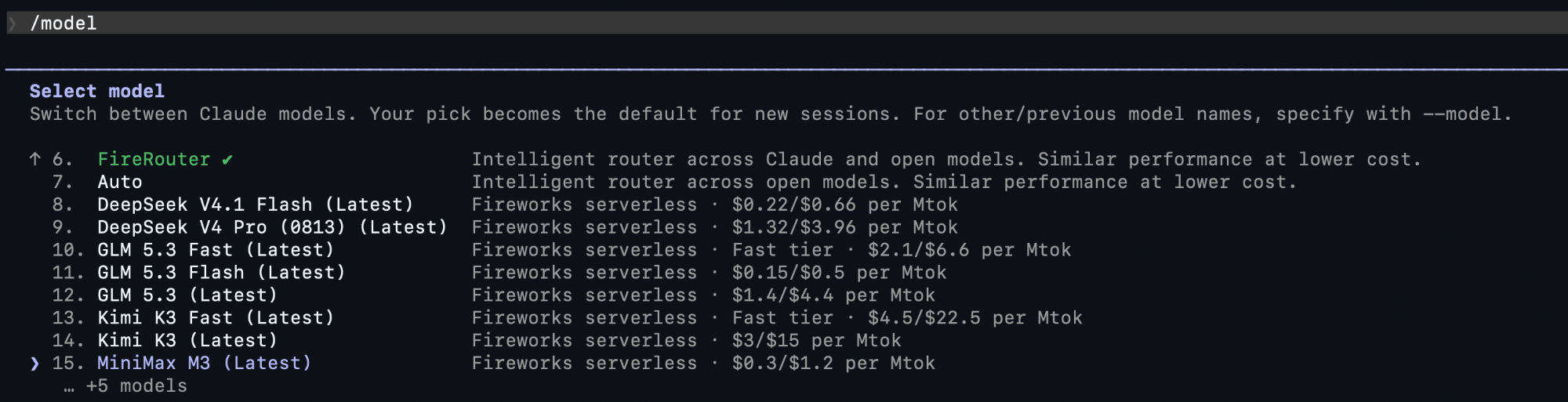
Fireworks models and routers in the Claude Code model picker
Connect and restore
- Connect rewrites the harness config to call Fireworks and saves a snapshot under
~/.fireconnect/. offrestores file-based harnesses from that snapshot byte-for-byte. For IDE databases, it removes the settings and models FireConnect added.- Sign-in credentials and harness configurations are stored separately.
fireconnect loginsaves your credential through FireConnect’s secret store. If a harness requires the key in its own configuration, FireConnect copies it there and restricts the file permissions. Runfireconnect statusto see the active storage backend without revealing the key.
Choose a model
Connecting registers coding-ready Fireworks models, includingauto. Use --model when you want to add or select an explicit model or router:
Use closed models without an LLM gateway
FireConnect does not require an LLM gateway. In Claude Code, routes with Claude models can use your Claude login. Some other harnesses accept a local Anthropic key. OpenAI models need an OpenAI key in Provider Keys. See Harness Compatibility for each harness.Web search
Web search works through Fireworks with no extra setup. In Claude Code, the nativeWebSearch and WebFetch tools run server-side on Fireworks. The Codex CLI, the Codex app, and the ChatGPT desktop app keep their native web search. Search works with any Fireworks model or FireRouter ID. Web search pricing will be published soon; see Web Search.
Earlier FireConnect versions installed a
fireworks-websearch MCP server for
Claude Code. That MCP is no longer available. Run fireconnect upgrade to
remove it; your own MCP servers are not changed. See
Web Search.